







We couldn’t find what you are looking for. Please try another way.
Apprentices
Thank you! Your submission has been received!
Oops! Something went wrong while submitting the form.
What is DevOps?
Apprentices
Team Multiverse
As the name suggests, DevOps combines development and operations, allowing modern businesses to create and iterate software more efficiently. This hybrid approach helps companies deliver high-quality products faster — and, ideally, beat their competitors to the punch.
What is DevOps?
DevOps is an engineering workflow methodology that brings together development and operations teams for seamless collaboration. These employees work closely together to design, build, and refine software applications.
The traditional software development model mostly separated operations and development teams. Software Developers would create an application, then hand it over to the operations team for deployment and management. If any issues occurred, the operations team would send it back for the Software Developers to correct — a process that could take days or even weeks.
DevOps breaks down these silos by encouraging collaboration and shortening feedback loops. Instead of working independently, all team members review applications at every stage. That way, they can catch issues early and make necessary improvements immediately.
While this approach might sound revolutionary, its core ideas have been around for over two decades. In 2001, a group of tech professionals published the Agile Manifesto, introducing a new methodology for software development. The Manifesto emphasised the importance of frequent feedback, laying the foundation for DevOps.
In 2009, John Allspaw and Paul Hammond presented a paper at the Velocity Conference titled “10+ Deploys Per Day: Dev and Ops Cooperation at Flickr.” Inspired by this paper and Agile practices, Patrick Debois organised the first DevOps Days in Belgium, officially starting a new movement.
Key principles of DevOps
The DevOps methodology is built on several guiding principles that businesses can adapt to their specific projects.
Most obviously, this model revolves around collaboration between cross-functional teams. Professionals work closely throughout the entire development process, sharing expertise and resources. This teamwork can empower them to create more innovative and effective products than they could have separately.
DevOps also encourages teams to automate processes to improve efficiency. For example, professionals might automate testing after every code change to double-check that the application still functions correctly. Many DevOps teams also use Infrastructure as Code (IaC) to automatically configure and manage infrastructure. Automating these routine tasks can save significant time and reduce the risk of costly mistakes.
Building on Agile development principles, continuous feedback and improvement are also core DevOps values. Tools like Datadog and Prometheus help teams monitor performance and identify opportunities for improvement. For example, if you notice glitches recorded in the system logs, you can quickly review the code to find the root cause. DevOps teams also gather feedback from colleagues and users regularly, promoting a culture of transparency and continuous improvement.
Benefits of DevOps
DevOps offers several significant advantages, contributing to its widespread popularity.
Rapid deployment
DevOps speeds up software delivery by streamlining the development process. When projects move smoothly through every stage, time-to-market decreases, reducing project costs. Faster releases also improve customer satisfaction and retention.
Improved software quality
Traditionally, development teams gathered feedback only near the end of the process — often when it was too late to make significant changes. By contrast, DevOps enables continuous feedback throughout the development lifecycle, allowing teams to address issues as they appear. The result? A more polished product, perfectly tailored to the end user.
Improved security
Treating security like an afterthought can leave applications vulnerable to cyber threats and data breaches. Plus, there’s always the risk that last-minute security practices will negatively affect the software’s performance.
Businesses can avoid these issues by adopting DevSecOps. This model works like regular DevOps, but it also integrates the security team into the entire application lifecycle. By designing systems with security in mind from the very beginning, companies can increase compliance and mitigate vulnerabilities.

Understanding the DevOps lifecycle
The DevOps lifecycle consists of five distinct phases:
Plan
The two teams collaborate to create a detailed project plan. This process involves prioritising tasks, setting deadlines, and developing a realistic budget. The collaborators also define their roles and delegate tasks, reducing the risk of future conflict or miscommunication.
Build
This phase involves the nitty-gritty tasks of building an application, such as writing code and designing product features. Developers typically take the lead here, but the operations team is still closely involved throughout the process.
Integrate
Individual team members typically often work on code independently, especially in remote work environments. Continuous integration allows them to frequently merge their code into a central repository. That way, every member can instantly see any changes made, reducing the risk of duplicate code.
This process is also essential for quality assurance, as it enables teams to continually check each other’s work. Catching errors earlier makes them easier and less expensive to fix.
Deliver
DevOps doesn’t stop after a business officially releases an application. Dev and ops teams typically continue to refine the software after the launch, updating features and making improvements. With continuous deployment, they can automatically push new features and other changes to users, allowing them to quickly respond to customer feedback.
Operate
Once an application is live, the DevOps team must also monitor and maintain software performance. Many issues can arise in the blink of an eye, from cyberattacks to unexpected issues. By automatically tracking performance metrics and setting up alerts for potential issues, the team can intervene quickly and resolve incidents.
Core DevOps practices
If you want to contribute to development and operations teams, you’ll need to understand a few essential practices:
- Continuous integration (CI): All code changes made by multiple developers get merged into a single codebase for consistency.
- Continuous delivery (CD): New code is automatically deployed after leaving the production pipeline, allowing users to see updates immediately.
- Infrastructure as Code (IaC): This model deploys the same infrastructure — such as networks and virtual machines — every time, enabling DevOps teams to test applications in consistent development environments.
- Monitoring and logging: Tools automatically track an application’s performance and log interactions, making it easier to identify bugs or anomalies.
There are plenty of resources available to help you learn these practices. For example, Coursera and Udemy offer free online courses on CI and CD. You can also watch tutorials on YouTube and other video platforms.
DevOps tools: The key tech and tools used in DevOps
Tech professionals rely on a wide range of tools to streamline and automate DevOps workflows. While mastering every technology isn’t necessary, especially at the beginning of your career, you should at least be familiar with key tools you might encounter on the job.
Jenkins is an open-source automation software that enables continuous integration and continuous delivery. DevOps professionals use this tool to build and test applications. The platform features hundreds of plugins for easy integration with other services, such as Amazon Web Services and Zoho.
Kubernetes and Docker often go hand-in-hand to develop and deploy software. Docker allows users to build and operate container applications that don’t require their own infrastructure. Developers can then use Kubernetes to manage and scale these containers. These applications save time, allowing DevOps teams to focus on designing unique software instead of creating everything from scratch.

For monitoring and analytics, many DevOps teams turn to two free tools: Prometheus and Grafana. Prometheus is a powerful open-source monitoring tool that continuously tracks your application’s performance. It offers real-time alerting, so you can instantly get notified of any problems.
Meanwhile, Grafana is an open-source analytics tool. It integrates with Prometheus and many other data sources, allowing you to compile all your performance data in one place. You can also transform this information into accessible data visualisations, making it easy to spot trends. For example, if you notice that your software tends to log errors at a specific time, you can investigate more closely to determine the reason.
How to get started with DevOps
As more companies adopt DevOps, it’s become one of the highest-paying tech jobs. According to Glassdoor, DevOps Engineers in the UK earn an average salary of £49K. It’s also a top career choice for introverts who balance a mixture of independent work and energetic collaboration.
Of course, you don’t need to become a DevOps Engineer to embrace this methodology. No matter your role, you can help promote a DevOps culture in your organisation by following these steps.
Start small with pilot projects
Convincing colleagues and managers to try DevOps practices can feel like an uphill battle. If your development and operations teams are firmly siloed, they might resist your invitation to collaborate. Plus, many people get attached to their familiar software delivery process and feel reluctant to overhaul it.
Luckily, you don’t need to jump into the deep end with DevOps right away. Instead, start gradually with low-stakes pilot projects. For example, you might practice monitoring an older project with Prometheus or encourage your team to give each other feedback using a tool like GitHub. These initiatives will help you introduce the DevOps process without the pressure of strict deadlines or major risks.
As your team gains confidence, you can slowly begin integrating more DevOps best practices into your projects. This could involve setting up a continuous integration tool like Jenkins or GitLab or adding continuous delivery for minor features. This gradual approach will allow your team to see the benefits of DevOps for themselves without overwhelming them.
Get stakeholder buy-in
DevOps isn’t the responsibility of one individual or team; it’s an organisational philosophy requiring universal support to implement. Many people, however, are wary about new tech frameworks. Change can be scary, especially for people who are used to working a different way.
Earning stakeholder buy-in is key to DevOps success. Start by gaining the support of leadership by educating them about the benefits of DevOps, such as improved collaboration and faster time-to-market. Consider using case studies and statistics to make your appeal more compelling. You could also develop a pilot project so the stakeholders can see the results of DevOps for themselves.
Once you’ve secured leadership support, it’s time to get the development and operations teams to buy in. This might be trickier, but don’t feel discouraged. Emphasise how DevOps can streamline their workloads by automating repetitive tasks and prioritising continuous feedback. Additionally, be sure to tout the benefits of increased collaboration and efficiency, which can reduce stress and boost productivity.
Focus on continuous improvement
At its core, DevOps is all about striving for continuous improvement. The best DevOps teams are dedicated to perfecting their products, returning to them as often as needed to keep everything working flawlessly.
At first, this process might sound exhausting or frustrating — after all, you don’t want to get stuck in an endless cycle of adjustments and updates. However, prioritising continuous improvement will help you provide the best user experience and maintain customer satisfaction. It can also save time in the long-run by allowing you to develop a strong foundation for your applications. That way, you’re less likely to encounter significant issues like bugs or security vulnerabilities when you deploy the finished product.
Master DevOps principles with Multiverse
DevOps has surged in popularity as organisations search for new ways to increase efficiency and gain a competitive edge. In 2024, approximately 10% of permanent tech job postings in the UK required DevOps skills, underscoring its growing importance.
A Multiverse tech apprenticeship can help you gain hands-on experience with DevOps methodologies and tools. Our 15-month Software Engineering programme teaches you how to develop full-stack applications in agile environments. Our structured modules cover a wide array of topics, from automation to CI/CD. Our knowledgeable coaches can also help you chart a career progression framework in tech to grow on your existing career path and interests.
Take the next step on your DevOps journey by completing our quick application today.

What does a Data Engineer do?
Apprentices
Team Multiverse
A Data Engineer builds data pipelines to collect and process information from multiple sources. These data streaming systems allow businesses to perform in-depth analyses and answer complex questions.
As more businesses embrace data-driven decision-making, the demand for Data Engineers will continue to grow. That means there are plenty of promising opportunities for people looking to upskill core data-based capabilities. In this guide, we’ll explore the role of Data Engineers, their key responsibilities, salaries, and more.
What is a Data Engineer?
A Data Engineer is responsible for building, managing, and fine-tuning an organisation’s data infrastructure. They create data pipelines that gather raw information and transform it into a usable format for data analysis.
As the amount of data grows exponentially, businesses rely on Data Engineers to sift through the noise and collect the most valuable information. Without these professionals, organisations would struggle to make sense of a vast sea of raw data in different formats.
For example, a retailer might want to understand why clients prefer certain products. The business could analyse many types of data, from customer reviews to purchase history and returns. A Data Engineer speeds up this process by collecting the relevant data points, organising them, and delivering them to Data Analysts for further evaluation.
Data engineering is the foundation of data science, which includes several similar but distinct career paths. Data Engineers focus on developing data pipelines to extract and organise information. This processed data is then analysed by Data Analysts to answer questions and detect trends. Some businesses also employ Data Scientists, who perform more complex statistical analyses and develop predictive models. In the above scenario, a Data Scientist could use historical customer data to predict future buying behavior.
Day in the life of a Data Engineer: Core responsibilities
A Data Engineer’s exact responsibilities can vary by role, but here are a few common tasks:
- Build data pipelines to collect and process information from various sources
- Maintain data systems to keep information flowing smoothly
- Evaluate the quality and reliability of collected data
- Store information in accessible data warehouses or data lakes for easy retrieval
- Collaborate with Data Scientists, Analysts, and other team members
Data Engineers use various tools and techniques to accomplish these fundamental tasks. For example, extract, transform, and load (ETL) processes allow them to combine both structured and unstructured data into a centralised location. Many professionals also rely on cloud infrastructure platforms — such as Amazon S3 and Google Cloud Storage — to store vast datasets remotely.
Key skills for Data Engineers
If you’re interested in a career in data engineering, you’ll need these essential technical skills:
- Structured Query Language: Used to build and communicate with relational databases
- Programming languages: Python and Scala are often used to construct pipelines, process data, and automate tasks
- Apache Spark: A powerful computing framework used to process enormous datasets quickly
- Mathematics: Discrete mathematics is used to build algorithms and handle data structures, while statistics helps detect trends and anomalies
- Cloud computing: Familiarity with cloud platforms like AWS and Azure is critical for storing and managing data securely
Of course, hard skills aren’t enough to excel in this field; strong soft skills are just as critical. Many data engineering projects are highly collaborative, requiring close collaboration with people from different departments. For example, a Data Analyst might ask you to aggregate information for business intelligence reports. Effective communication helps you simplify complicated concepts and build positive relationships with all team members.
You’ll inevitably encounter challenges, especially when dealing with complex or messy data, so excellent problem-solving skills are a must. Being adaptable will also enable you to learn new techniques and master the latest technologies.
Certifications can help you gain new skills and demonstrate your expertise to potential employers. Consider pursuing industry-recognised credentials, such as AWS Certified Data Analytics and Google Professional Data Engineer.
The importance of data engineering in modern businesses
In 2025, it’s predicted that users will generate and consume a staggering 182 zettabytes of data. Traditional data processing and analytics methods simply can’t keep up with this exponentially growing flood of information.
That’s where Data Engineers come in. They develop infrastructure to collect the right information and make the data usable for analysis. This process allows leaders to make strategic business decisions based on accurate and relevant data, rather than a random jumble of information.
Many industries rely heavily on data engineering for high-stakes decision-making. For example, finance institutions use fraud detection systems to automatically identify and block suspicious transactions. Similarly, data engineering empowers healthcare organisations to analyse patient data and improve the quality of care. Without this field, businesses would struggle to analyse information and address emerging issues effectively.
Tools and technologies used by Data Engineers
Even the most experienced Data Engineers can’t manually process millions of data points. Instead, they rely on sophisticated tools to automate and streamline data workflows.
Apache Hadoop is one of the most critical technologies, using parallel processing to handle big data efficiently. Many professionals also turn to Snowflake for building batch data pipelines quickly, while Apache Airflow allows users to design and automate workflows. These technologies can save significant time and reduce the risk of errors.
How to become a Data Engineer
There’s no one-size-fits-all approach to becoming a Data Engineer. You can use many strategies to gain the necessary knowledge and skills, giving you the freedom to shape your professional journey.
It all starts with developing foundational programming and database skills. Most Data Engineers rely on SQL to manage databases, while Python is commonly used for routine tasks like data storage and processing. Online courses or coding bootcamps can help you learn these languages quickly.
Beyond these basic skills, a Multiverse apprenticeship is one of the best ways to expand your data engineering knowledge. Our three-year Advanced Data Fellowship teaches you how to analyse information and design innovative data solutions. It covers advanced topics like data governance and predictive analytics. You’ll also gain hands-on experience by applying your newfound skills in your current role.
Once you’ve gained the necessary skills, start looking for entry-level roles like Business Data Analyst or Junior Data Engineer. These positions will allow you to refine your skills further and may lead to more advanced positions as you gain experience.
For example, Daniel Beach began his career in a completely unrelated field — agriculture. In 2013, he decided to pivot to data engineering and taught himself SQL. With this self-taught knowledge, he landed a Data Analyst position at a bank. From there, he quickly climbed the career ladder, moving from Senior Data Analyst to Business Intelligence Engineer, then to Data Engineer, and finally to his current role as Senior Data Engineer.
Career progression for Data Engineers
Data engineering is a vast field with ample opportunities for advancement and specialisation. Here’s one possible career trajectory, with salary data from Glassdoor.
Data Analyst
Average UK salary: £41K
A Data Analyst uses statistical methods and software to gather and study data. They search for meaningful trends in datasets and communicate their insights to stakeholders. For instance, they might create data visualizations or dashboards to present their findings in accessible formats.
Junior Data Engineer
Average UK salary: £31K
A Junior Data Engineer typically works under the guidance of more experienced data professionals. Their responsibilities include fundamental tasks like collecting, cleaning, and storing data. They may also assist with building and optimizing data pipelines and troubleshooting issues.
Data Engineer
Average UK salary: £48k
A Data Engineer handles more advanced tasks, such as designing sophisticated data pipelines and solving business problems autonomously. This mid-level role typically requires two to five years of experience in data engineering.
Big Data Engineer
Average UK salary: £46k
A Big Data Engineer specialises in developing and managing pipelines for big data. These systems must be scalable and capable of handling vast, ever-increasing amounts of information without experiencing performance issues. Big Data Engineers often collaborate with Machine Learning Engineers and other professionals who rely on big data for analysis and decision-making.
Lead Data Engineer
Average UK salary: £72K
As the name suggests, a Lead Data Engineer oversees a team of engineers. They plan complex data architecture, delegate tasks, and manage large-scale projects. They’re also responsible for mentoring junior employees.
Advance your data engineering career with Multiverse
Once a niche field, data engineering has become an integral part of modern business operations. It’s the foundation of advanced analytics and data management, helping businesses get the most out of their data.
Take the next step on your upskilling journey with a Multiverse apprenticeship. Our Data Fellowship programmes teach fundamental technical skills, such as data visualization and machine learning. You’ll strengthen your data engineering knowledge as you complete our online curriculum and collaborate with peers. Plus, you’ll receive personalised career coaching from industry experts. All without having to put your career on hold.
Ready to take the leap? Get started today by completing our quick application.
Understanding AI ethics: What every professional needs to know
Apprentices
Team Multiverse
In January 2025, for example, the book-tracking app Fable drew controversy when its AI generator produced insensitive annual summaries for readers. Meanwhile, in December 2024, Italy ordered OpenAI to pay a €15 million penalty for data privacy violations.
These real-world examples reflect broader concerns about the ethical implications of AI in the workforce. According to Multiverse’s The ROI of AI report, 36% of workers believe their organization lacks responsible and ethical AI practices. Despite this, 93% feel confident they have used this technology ethically. But without the proper training, many people fail to recognize how AI can be misused.
This article explores key AI principles and emerging ethical dilemmas. We’ll also share practical strategies for upskillers who want to learn how to follow AI ethical frameworks in the workplace.
What is AI ethics?
As Dr. David Leslie of the Alan Turing Institute explains, “AI ethics is a set of values, principles, and techniques that employ widely accepted standards of right and wrong to guide moral conduct in the development and use of AI technologies.”
Many organizations have created AI codes of ethics to help developers and other professionals use this technology responsibly. These guidelines outline AI ethical principles and may include industry-specific standards.
For example, the Market Research Society released an AI ethics guide urging practitioners to “prioritize and safeguard participants’ privacy and data rights” when using AI in research projects. Similarly, the Institute and Faculty of Actuaries and the Royal Statistical Society co-published a guide to ethical data science that requires members to “maintai[n] human oversight of automated solutions,” including AI systems.
While these principles might seem abstract at first, they can help professionals recognize and address ethical concerns. Here are a few scenarios that workers may encounter:
- A Human Resources Specialist notices that AI-powered resume screening software consistently filters out women.
- A Data Scientist is asked to analyze confidential customer data without obtaining consent.
- A marketer uses a text-to-image generator to create visual content for social media, but the images misrepresent the products.
An AI ethics code empowers professionals to make moral decisions that prioritize human interests and minimize risks.
Key principles of AI ethics
There’s no universal framework for AI ethics. But a few foundational tenets appear consistently in guidelines from professional organizations and government agencies.
Transparency and accountability are two central ethical principles for AI. According to the Ada Lovelace Institute, businesses should practice transparency by creating clear data-sharing agreements and publishing spending data. Impact assessments and audits also promote accountability.
Fairness is another key part of AI ethical guidelines. AI systems should be designed to avoid discrimination against any communities or individuals. For example, the Microsoft Responsible AI Standard requires AI developers to “minimize the potential for stereotyping, demeaning, or erasing identified demographic groups, including marginalized groups.” This process involves ongoing bias checks and collaborating with members of diverse demographic groups to understand how AI tools impact them.
Additionally, respect for human dignity and autonomy are core AI moral principles. For instance, the Council of Europe requires member states to “ensure that activities within the lifecycle of artificial intelligence systems are fully consistent with human rights, democracy, and the rule of law.”
Privacy and data protection are two more guiding principles for AI development and usage. The UK General Data Protection Regulation requires businesses to only collect personal data for specified and legitimate purposes. Companies must also keep this information secure and delete it when they no longer need it.
Ethical challenges in AI
While artificial intelligence offers many benefits, it also has several troubling ethical implications. You may encounter these common challenges while designing or using AI tools.
Algorithmic bias
Without careful oversight, algorithmic systems can unintentionally reinforce unconscious biases. This often occurs when businesses train AI models with incomplete or unrepresentative data sets, leading to selection bias. Additionally, AI systems can cause harm by treating certain groups differently.
For example, a 2024 lawsuit against SafeRent alleged that the platform used a biased algorithm to score rental applicants. The algorithm didn’t factor in housing benefits and weighed credit information too heavily, leading to discrimination against low-income applicants and people of color.
Lack of transparency
Many companies have developed “black box” AI systems that don’t explain how they operate. For example, when you use ChatGPT, you see your inputs and outputs, but what happens in between is a mystery.
This secrecy raises troubling questions about the possibility of incorrect answers and hidden bias. After all, you can’t say for certain that a result is correct and fair if you can’t check the math yourself. As a result, many users mistrust AI technologies.
Major AI platforms also frequently withhold information about how they train their AI models. In 2024, book authors filed a lawsuit against NVIDIA, claiming the company’s AI training data “comes from copyrighted works” that were copied “without consent, without credit, and without compensation.” By refusing to disclose their source materials, AI companies risk violating intellectual property rights and angering human creators.
Tech dominance
When you think about companies developing AI systems, you probably picture tech giants like Amazon and Meta. These mega-corporations have significantly influenced the AI industry, raising concerns about monopolies. Sarah Cardwell, the CEO of the UK’s Competition and Markets Authority, observes that the dominance of a few companies “could shape [AI] markets in a way that harms competition and reduces choice and quality for businesses and consumers.”
Practical steps for professionals to adhere to AI ethical frameworks
Practicing AI ethics involves more than basic steps like not uploading customer data to ChatGPT. It requires a deeper understanding of how these systems work and their ethical considerations.
Stay educated on AI principles
Artificial technologies are evolving at lightning speed, with new applications and tools emerging monthly. Following industry-recognized AI ethics guidelines allows you to stay up-to-date and adapt to new challenges.
Online courses allow you to learn AI guiding principles at your own pace. For example, Multiverse’s AI Jumpstart module provides a foundation for core AI concepts like prompt engineering and machine learning. You’ll also learn to analyze AI outputs for ethical considerations like implicit bias. This flexible training will help you future-proof your career while expanding your technical skills.
Trustworthy resources from industry leaders are another invaluable source of AI training. Professional associations often create AI ethics codes and host educational workshops about new tools. Additionally, a mentor can offer one-on-one guidance when you face ethical issues, such as over-reliance on AI within your organization or using AI tools to create manipulative advertising.
Promote transparency in your work
When it comes to the ethical use of AI, transparency is non-negotiable. Always document your AI workflows clearly so others can review and understand your processes. This might involve making your AI code open-source or explaining how you used Midjourney to design a magazine ad.
This transparency should also extend to your data. Make sure to use diverse data sets that are ethically sourced and labeled. The data should also be free from undisclosed biases, such as the underrepresentation of people from certain age groups or geographic areas.
Invest in continuous skill development
As more businesses embrace artificial intelligence tools, upskilling is key to advancing your career while gaining a deeper understanding of AI ethics.
According to the Multiverse Skills Intelligence Report, 90% of employees want to improve their data skills. Multiverse’s AI for Business Value apprenticeship is an excellent opportunity to strengthen these skills. You'll learn how to use structured data to drive business value while mitigating AI risks.
There are also many informal opportunities to expand your knowledge of AI ethics. Participating in discussions and industry events can empower you to share your perspectives and learn from peers with similar ethical values. For instance, you could join the r/AIethics subreddit or attend events organized by the Institute for AI in Ethics.
Become an ethical AI leader
For centuries, science fiction stories like Frankenstein and Jurassic Park have explored the ethics of technology. With the emergence of AI, these moral dilemmas have become much more pressing and real.
Staying informed and continuously upskilling will enable you to navigate these changes responsibly. Multiverse’s free apprenticeship programs can help you gain practical experience while learning ethical AI practices. Take the next step by applying today.
The best Excel formulas to speed up your work
Apprentices
Katie LoFaso
This lack of knowledge reveals a significant skills gap. The Multiverse Skills Intelligence Report 2024 found that 57% of employees have no or only basic Excel skills, despite its widespread use. As Euan Blair, CEO of Multiverse, observes, “Workers are wasting hundreds of hours a year because they lack the skills to handle data effectively.”
The good news? Mastering Excel formulas can boost your productivity, helping you build and manage spreadsheets faster while reducing errors. In this guide, we’ll explore the most useful Excel formulas, grouped by function.
What is an Excel formula?
An Excel formula is a set of instructions entered into a cell to perform calculations or actions on your spreadsheet data.
Formulas are incredibly useful shortcuts that let you automate complex or repetitive tasks. For example, manually adding 1,000 financial transactions might take hours, especially if you double-check your work. With the SUM function, you can calculate the total accurately in a few seconds.
The anatomy of an Excel formula
Every Microsoft Excel formula begins with an equal sign. This symbol signals to the platform that you’re entering a formula instead of plain text.
A formula’s anatomy may also include some or all of these components:
- Functions like AVERAGE and MAX tell Excel which calculation or action to perform with your data.
- Operators are mathematical symbols, such as a plus or minus sign. They’re used for basic calculations or to compare values in a formula.
- References identify the specific cells in the spreadsheet that the formula should use. For example, you might multiply A1 * B1.
- Parentheses specify which part of the formula to calculate first. These symbols are essential for complex formulas, especially when you need to change the normal order of operations.
Let’s say you have a spreadsheet with customer demographic data, and you want to calculate the average income. If this data is listed in column B, your formula would look like this:
=AVERAGE(B2:B120)
If we analyse this formula’s anatomy, AVERAGE is the function, and B2 and B120 are the references.
Excel applications in the workplace
There’s a reason why Excel is so popular: It’s one of the most versatile tools in the modern workplace.
Data analysis is one of the most common Excel applications. Professionals use this platform to analyse a wide range of numerical and qualitative data. Depending on your role, you might use Excel functions to identify sales trends or measure employee productivity. The software can also transform the results into data visualizations like charts and graphs, making it easy to share findings with colleagues or clients.
Additionally, Excel formulas can help you make more strategic decisions. For instance, the IF function allows you to test two scenarios: one with a TRUE result and the other with a FALSE result. This what-if analysis allows you to explore the potential outcomes of different scenarios, such as decreasing your budget or adjusting pricing.
Excel formulas can also save time in the workplace, leading to significant productivity increases. According to the Multiverse Skills Intelligence Report, employees waste an average of 4.34 hours weekly — or a staggering 25 work days per year — completing data tasks inefficiently. With the right formulas, you can speed up these tasks and use the time you save on more critical activities.
Basic Excel formulas to know
You might assume that you need to become a Data Scientist to use Excel functions, but that’s not the case. With just a day or two of practice, you can learn these basic formulas and quickly upskill.
Arithmetic formulas
Excel users often need to perform calculations with numerical values. Instead of reaching for a calculator, you can use these simple Excel functions to get results quickly.

Use the SUM formula to add the values of cells. Source: Microsoft Support.
The SUM formula is =SUM(A1:A10). It adds the values in a given range of cells. Use it to quickly tally up numerical data, such as sales and inventory quantities.
The AVERAGE formula is =AVERAGE(A1:A10). As the name suggests, it adds up all the values in a range and calculates the average. For example, you could use it to find the average purchase amount or the average competitor pricing.
To calculate the number of numeric entries, use the COUNT function, which is =COUNT(A1:A10). This formula is handy when you need to count specific data points, such as the number of financial transactions or returns.
Text formulas
If you spend a lot of time working with text in Excel, you know how tedious it can be to edit individual cells. With text formulas, you can manage qualitative data as efficiently as numeric values.
The CONCATENATE function is =CONCAT(A1,B1). It lets you combine text from two or more cells into a single string. Say, for instance, you entered customer street addresses and cities into separate cells. With this function, you can easily combine them for faster shipping or improved data analysis.
You can remove extra spaces from text with the TRIM function, which is =TRIM(A1). This formula is helpful when you accidentally add double spaces before, between, or after words.
Excel formulas also allow you to quickly change the case of text. The UPPER formula is =UPPER(A1), which converts the entire cell to uppercase. For the opposite effect, use the LOWER formula, which is =LOWER(A1).
Date formulas
There are many reasons why you might need to add the current date to a spreadsheet. Maybe you’re working on a financial analysis with time-sensitive data or counting down the days until a deadline. Use one of these formulas to add the date:
- =TODAY() - Inserts the current date
- =NOW() - Adds the current date and time
These are dynamic formulas, which means they’ll update every time you open or refresh the spreadsheet. That way, you don’t need to change this information manually.
Advanced Excel formulas for efficiency
Once you’ve mastered basic Excel formulas, you can learn how to perform complex calculations. These advanced formulas can drastically improve your productivity and strengthen your data analysis skills.
Lookup and reference formulas
Businesses often create vast Excel spreadsheets with hundreds or even thousands of columns and rows. Manually locating specific data points in this sea of information can be frustrating and overwhelming. Lookup functions solve this issue by allowing you to quickly find data.
The VLOOKUP function searches for values in a table by column. To calculate it, enter =VLOOKUP(value you’re searching for, table, col_index, [range_lookup]). For example, you might use this formula to find a customer’s name based on their phone number or locate an employee’s salary by their ID number.
The INDEX function returns the value of a given location in a range of cells. Its formula is =INDEX(array, row_number, col_numb). Use it to retrieve data from a specific place in a table. If you sort products by the number of sales, for instance, you might look up the price of an item from the bottom of the list.
Before using the INDEX function, you must identify the data’s exact data. Enter the MATCH function, which is =MATCH(lookup_value, lookup_array, [match_type]). It finds the location of an item — such as an employee or product — within a range. Together, INDEX and MATCH are two of the most important Excel formulas because they let you pinpoint any data in complex spreadsheets.
Conditional formulas
A conditional formula lets you analyse data that meets specific criteria. These Excel functions return different results based on whether the condition is true or false.
You can perform logic tests with the IF formula, which is =IF(condition, value_if_true, value_if_false). Say, for instance, you offer an exclusive discount to customers who spend over $500 in a year. If you place a client’s total spend in column B2, your formula will look like this: =IF(B2 > 500, “Discount”, “No Discount”).
Similarly, SUMIF adds cells if they meet certain criteria. Calculate it with =SUMIF(range, criteria, [sum_range]). Suppose you want to calculate the total earnings for Sales Representatives who have met a $200,000 revenue target and earned a $10,000 commission.
If you store their annual revenue in A2 to A13 and the commission amount in the B column for people who meet the target, your formula would be: =SUMIF(A2:A13, “>200000”, B2:B13). This formula will only calculate the total earnings for Representatives who earn over $200,000 in revenue.
Data analysis formulas
Advanced Excel formulas let you perform complex data analysis with the click of a button. Here are a few functions often used to gain business insights from datasets:
- =MAX(A1:A10) calculates the maximum value in a range
- =MIN(A1:A10) returns the minimum value
- =COUNTIF(range, criteria) only counts cells that meet the defined criteria
For example, you could use the MAX and MIN functions to identify the marketing campaigns with the highest and lowest returns on investment.
Best practices for using Excel formulas
Using formulas in Excel can seem intimidating, especially if you’re unfamiliar with this platform. But don’t worry. Our Excel tips will help you create formulas that boost your productivity and lighten your to-do list.
Start with the basics
Whether you’re using basic or advanced Excel formulas, you must format them properly to get results. Set yourself up for success with these best practices:
- Always begin formulas with an equal sign
- Consider using Formula Autocomplete to improve accuracy
- Turn on conditional formatting to spot patterns in your data set faster
- Use the formula bar to double-check syntax for errors
Use cell references
A spreadsheet can change drastically over time as you add or delete data. Using cell references instead of hardcoded numbers allows your formulas to adapt to these changes automatically.
Say, for instance, your annual membership is in column A, and you add a $30 fee. Instead of writing =A2 +30, you could add the fee in column B and write =A2 + B2. That way, the sum will automatically update if you change the membership or fee in the future.
You can also create named ranges to improve readability and accuracy. For example, instead of referring to a column as “=Sheet1!$B$2:$B$12”, you could simplify it by naming the selected range “Earnings.” This easy step can help you interpret spreadsheets faster and with more confidence.
Validate your work
While Excel formulas can perform sophisticated calculations, they’re only accurate if you set them up correctly. You can improve precision with Excel’s built-in tools, such as error checking and formula auditing. Testing formulas on small data sets can also help you catch and fix any issues before scaling them to larger ones.
Real-world applications for professionals
Professionals can use Excel formulas in many different roles. For instance, Business Data Analysts can apply SUMIF and VLOOKUP to track budgets and identify specific expenses. Similarly, Operations Managers can monitor project timelines and transportation schedules with date functions like TODAY() and DATEDIF.
Excel formulas also allow marketers to analyse campaign performance. This might involve using the AVERAGE function to measure engagement levels or COUNTIF to identify email campaigns that achieve specific open rates.
Become an Excel whiz
Whether you use Excel every day or only occasionally, learning formulas can open new opportunities for career growth. These functions empower you to manage and analyse data more efficiently, helping you work smarter and make educated decisions.
Sharpen your skills by experimenting with both basic and advanced Excel formulas. As you gain confidence, you can explore more powerful data tools, such as Microsoft Power BI or artificial intelligence-powered analytics software.
While it’s completely possible to learn Excel formulas on your own, a structured program can help you gain more sophisticated data science skills. Multiverse’s free Data and Insights for Business Decisions apprenticeship is the perfect opportunity to level up your skills and master new tools. You’ll learn how to analyse data with AI, predictive analytics, and other advanced methods.
Are you ready to expand your technical skills and advance your career? Apply today, and the Multiverse team will get in touch to discuss the next steps.
What is a database? Comprehensive overview for data pros and beginners
Apprentices
Team Multiverse
When you use Google Maps to drive to work, the platform relies on its geospatial database to suggest the best route. Once you’re at your desk checking your inbox, the email server retrieves your messages from a vast database. And if you need to backup a file, you’ll probably store it in a cloud database like Google Drive or Dropbox.
These are just a few ways professionals interact with databases, often without even realising it. These tools power virtually every technology used by businesses, from attendance trackers to web applications.
So what is a database, exactly? In this article, we’ll explore the different types of databases and their applications in the business world.
What is a database?
A database is an electronic system used to store and manage an organised collection of data. Businesses use databases to securely store various kinds of data, such as:
- Customer contact information
- Employee performance data
- Financial transactions
- Health records
- Images
- Product inventories
- Videos
Software developers have created many types of database management systems (DBMS) to handle different kinds of information. One of the most popular systems is MySQL, which organises data in rows and columns. By contrast, MongoDB can store unstructured data, such as images and audio files, that doesn’t fit neatly into tables.
No matter which DBMS you use, you can query — or search — it to quickly retrieve data. For example, if you have a database with 2,000 photos, you might use dates or keywords to locate the images you need. That way, you don’t have to spend time sifting through them all manually.
Of course, databases aren’t just convenient storage tools. They’re also the foundation of business data analytics. These digital repositories allow you to retrieve data to analyse with statistical methods and other tools. The insights you gain can lead to more educated business decision-making.
Suppose you want to analyse customer data to learn more about your client base. With a well-organised database, you can easily retrieve demographic data for each customer. Platforms like Microsoft Power BI and Tableau allow you to analyse this data and find patterns. For instance, if you notice that your audience is mostly Millennial women, you could launch a marketing campaign to appeal to this group and boost revenue.
Types of databases
The type of data you’re storing will help determine which kind of database to use. Here are a few common kinds of repositories that you may already interact with in your day-to-day activities.
Relational databases
Companies often gather data points that are related to each other. For example, you might collect your customers’ names and email addresses or employee IDs and salary information.
If you store all this information separately in a database, it would be like a vast soup of data, leading to absolute chaos. You’d have no way of knowing who the contact information belongs to, making it impossible to personalise your email marketing. And if you have a large team, you’d never be able to match salaries to the right employees.
That’s where relational databases come in. They store data neatly in tables with columns and rows. Every row contains a single record — such as a product or customer — while columns represent predefined categories. This format lets you easily identify and understand the connections between data points.
Here’s a visualisation of a simple relational database for employee data:

Database administrators and other professionals use Structured Query Language (SQL) to build and manage relational databases. This programming language uses schemas — or pre-determined rules — to organise data points into tables. It also lets you retrieve specific data, such as a list of Project Managers or employees earning less than £40,000.
While SQL allows you to build a relational database model from scratch, you can also use pre-built systems like MySQL, PostgreSQL, and Microsoft SQL Server (MSSQL). They all use tables to organise data but have different features and limitations. For example, MySQL is a completely free open-source tool, while MSSQL requires you to pay for a licence to access all the features.
NoSQL databases
NoSQL may seem like the opposite of SQL, but it actually stands for “not only SQL.” These database management systems are perfect for handling unstructured or distributed data.
Structure is one of the biggest differences between SQL and NoSQL databases. While SQL databases use predefined tables, NoSQL databases have flexible schemas, allowing them to manage non-relational or unstructured data with ease. For example, in a document database, you might store blog posts and their metadata in JSON format. This approach lets you organise posts with various types of content effectively.
NoSQL databases are also easier to scale than SQL systems, making them a popular choice for managing big or complex datasets. This can include sensor readings from the Internet of Things devices, social media posts, and other data sources that can’t fit into tables.
Like SQL, NoSQL has many established systems with different data models. For instance, Cassandra stores information in columns, while MongoDB uses a document-based format.
Other types of databases
While SQL and NoSQL are the most popular DBMS, they’re far from the only options.
Graph database systems like Neo4j organise data with nodes and relationships. These intricate networks can help you uncover connections between items that might otherwise get overlooked. For example, you could use a graph database to analyse the relationships between customers and products and offer personalised recommendations.
On the other hand, an object oriented database stores data as objects, consisting of properties and methods, or actions you can perform with the objects. In a grocery store database, for instance, a “product” object could have the properties “name” and “expiration date.” Each object could also have methods like “updateInventory” or “checkExpiration.” Popular object oriented databases include db4o and Objectivity.
Meanwhile, hierarchical databases use tree-like structures with parent-child relationships to organise related data points. A grocery store could create parent records for different departments, with child records representing individual products. One of the most well-known hierarchical databases is IBM’s Information Management System.
Components of a database
Even the smallest databases can have surprisingly complex structures. Every database system includes these key components:
Hardware
All databases depend on physical systems for data storage. This hardware includes computers, hard drives, and other equipment.
For cloud databases, this hardware is typically stored and managed off-site by the service provider. The most secure databases have multiple physical locations to reduce the risk of data loss from natural disasters and other catastrophes. Amazon alone has built over 100 data centers to contain its physical equipment.
Software
DBMS tools like Oracle Database and MySQL bridge the gap between hardware and users. Database software allows you to control and access your data, even if you’re thousands of miles away from the physical computer system.
Data
Databases contain raw information, known as data, and organise it into a usable format. There are many types of data, from audio files to text and transaction records.
Most databases also include metadata, or “data about data.” It provides additional information about the dataset’s properties, such as the author and creation date of files.
Access language
Like most software, databases don’t “speak” English. Instead, you need to use a programming language to write commands in a format that a database can understand. For example, you could use SQL to query or delete data from a relational database.
Procedures
A database management system has specific rules and processes to help you manage and operate it. These procedures often include guidelines for setting up the database and creating backups.
Database management systems (DBMS)
A database management system is software used to create, manage, and maintain databases. This technology lets you modify the logical structure — like by merging or separating records — without having to rewrite the entire database.
A DBMS also includes access controls to restrict what users can view or modify, improving data security. Plus, it has built-in features for data backup and recovery, giving you extra peace of mind.
Applications of databases in business
You may assume that only tech professionals use databases, but that’s not true. This technology supports countless business functions in every industry.
Marketing and sales professionals often rely on customer relationship management (CRM) systems like Salesforce. These platforms let users store and manage contact information and other customer data.
Similarly, databases allow banks to process financial transactions almost instantly. If a customer swipes their debit card to pay for a meal, the bank's database checks their account balance and verifies they've entered the right PIN number. Based on this data, the database will approve or deny the transaction.
Supply chain management is another common application for databases. Companies can use a DBMS to track their inventory in real time, reducing the risk of over- or understocking products.
Finally, businesses in all industries can use databases for data analysis. A bank might analyse financial records to detect fraud, while marketers can gain insights about customer behavior and preferences.
Common database challenges
While databases have become increasingly critical to business operations, they’re not always easy to manage. Here are a few common database challenges that you may encounter.
Data security
Databases often store sensitive data like credit card numbers and addresses. This valuable information can make them a prime target for cyber criminals — especially in industries that collect vast amounts of personal or financial data.
In 2024, for instance, hackers breached the Ministry of Defence’s payroll system and stole the bank details of UK military personnel. That same year, cyber criminals launched a ransomware attack on a medical diagnostics service, disrupting operations at several London hospitals.While cyber attacks on databases are a serious threat, you can use many strategies to protect sensitive information. For example, you should always encrypt data when you’re transferring it between databases. Access controls like multi-factor authentication and biometric readers can also reduce the risk of data breaches.
Scalability
An organisation’s data needs can drastically change over time. For example, the amount of demographic data you collect may increase exponentially as you reach new audiences. That’s why it’s critical to choose a database system that can scale with your business.
Performance optimisation
Huge databases may handle hundreds or thousands of requests per minute, especially if they’re central to your operations. This high traffic can cause frustrating performance issues like bottlenecks and delayed queries.
Fortunately, there are many ways to speed up your database and keep it in top shape. This often involves using query caching to reduce the strain on the database and rewriting sluggish queries.
Backup and recovery
Even the most vigilant businesses can experience devastating database failures. For instance, a flash flood could wipe out your hardware, or a hacker might corrupt your software with malware. If you’re not prepared, these disasters could lead to catastrophic data loss.
Regular backups are key to protecting your valuable data. Choose database software that automatically backs up your information to secure locations. You could also use a distributed database to replicate your data across multiple servers in different locations. That way, you can recover quickly if one server fails.
If the worst case scenario happens, don’t panic. Database software often has built-in recovery tools to help you restore some or all of your lost information.
Become a database management expert
As businesses increasingly rely on data for every operation, databases have become an essential tool in every industry. However, many people don’t know how to use this technology effectively. According to the Multiverse Intelligence Report 2024, 42% of employees struggle to structure, prepare, and manipulate data.
Upskilling can help you expand your database knowledge and prepare to take on more data-oriented tasks. Get started with a Multiverse’s data analytics apprenticeship. You’ll gain hands-on experience as you learn how to develop data infrastructure and use data tools. The best part? You can keep working in your current role as you learn.
Ready to take the next step on your professional journey? Apply for a Multiverse data apprenticeship today.
What is machine learning?
Apprentices
Team Multiverse
To create the systems, ML professionals must first develop, train, and evaluate them. To do this, they leverage large amounts of data and statistical algorithms. If successful, the computer system can mimic how humans learn and perform specific tasks.
An organisation may invest in machine learning for multiple reasons. Fraud prevention and offering personalised customer recommendations are two everyday use cases. Automating specific tasks that would otherwise take serious time and resources is another.
For example, a Machine Learning Engineer might use machine learning to organise large amounts of data for them before they analyse it. Because they don't need to organise the data manually, it's much quicker for a specialist to gain insights.
You may have heard people use the terms machine learning and AI interchangeably. While these fields are similar in many ways — they're not the same.
Think of it this way: Machine learning is how a computer system learns and creates its "intelligence." On the other hand, AI is what a computer system uses to put that "intelligence" into action. Let's return to our data analysis scenario. Machine learning is how a computer learns to organise data. The computer uses AI to organise data with little to no human input.
Now you know what machine learning is, here's why it matters to your career. Whether you have or don't have machine learning skills, one thing remains the same: ML will fundamentally change how we work.
You only need to look at the industry's market growth to see the future of work — though it's arguably already here. By 2030, experts predict the market volume for machine learning will likely reach £371.50bn.
What do businesses use machine learning for?
Around 514 UK companies used "machine learning" to describe themselves and their offering(s) in early 2023. Of those 514, computer software companies made up the most considerable portion at 37%.
Aside from the growing number of self-described "machine learning" companies, organisations of all sizes and across industries use ML techniques in everyday operations. A business may use machine learning to implement an AI program. For example, a company could build a custom GPT, meaning they've either knowingly or unknowingly used ML.
Companies also use ML in the following ways:
- Fraud prevention: A business can use machine learning to find fraudulent behaviour across business operations. That could mean finding and removing instances of phishing across company email or phones.
- Personalised recommendations: Research by SurveyMonkey reveals that nearly half of customers "are interested in getting personalised deals." As a result, businesses that want to improve customer experiences are using ML to help them meet this demand. In this context, machine learning can help build systems that suggest products — or even offer tailored discounts — using past customer purchases and website interactions.
- Segmenting customers and app users: Machine learning algorithms can organise large volumes of data into different categories much quicker than a human could. That's why many companies deploy these algorithms to uncover different audience segments for them. A company like Spotify could use ML in this way to serve relevant ads to different user segments.
What are the two approaches to machine learning?
Supervised and unsupervised learning are the two main approaches (or categories) within machine learning. Machine Learning Engineers use both methods to train models. However, supervised and unsupervised learning train them differently. Let's take a closer look at each.
Supervised
As a Machine Learning Engineer, you'd use a supervised approach to train a predictive model using a labelled dataset. That means for every input, there's a related output. You may pick this approach if you want the model to compare input data to the actual outputs. It can then make more accurate predictions based on the data.
Use case: You can use supervised learning to categorise and label data. So, for fraud prevention, you might use this approach to train a model that marks company emails as "spam" or "not spam."
Unsupervised
As a Machine Learning Engineer, you'd use an unsupervised approach to train a model using an unlabelled dataset. You may pick this approach to uncover patterns or relationships within the data without using predefined outcomes or providing guidance.
Use case: Unsupervised learning can cluster data into naturally occurring categories. You might use this approach to uncover existing patterns or relationships within the data to help segment customers and app users into groups.
How do machine learning algorithms work?
Let's break down how machine learning algorithms work:
- Forward pass: A Forward Pass is the calculation process used by an ML algorithm to produce an output or prediction based on input data. Input data can be anything from images to text or numbers — it all depends on the problem you're trying to solve.
- Loss function: A loss function calculates the difference between the predicted values of a model and the actual values in the training data. The loss function aims to help a model adjust its parameters during training to improve accuracy and reduce error.
- Model optimisation process: The model optimisation process gradually adjusts and improves the model's internal parameters. An ML algorithm will base these gradual adjustments on the calculated loss. The model optimisation process aims to reduce this loss, improving the model's accuracy and effectiveness over time. The algorithm repeats the process until it optimises the model sufficiently.
What do Machine Learning Engineers do?
Machine Learning Engineers of all experience levels work with complex data sets. With that in mind, tasks include finding, organising and analysing large volumes of data from different sources. ML professionals will also use programming languages to build, evaluate and improve machine learning models.
Aside from perfecting models, Machine Learning Engineers develop, train, and deploy machine learning algorithms. ML specialists, their colleagues and computer systems can then use the algorithms to complete tasks, make predictions or solve business challenges.
Machine Learning Engineers usually sit within the broader data science team. As such, a data science colleague may ask them to help build and perfect AI systems that use machine learning. Because of this, they need to communicate and collaborate with Data Scientists and other colleagues who develop and use these systems.
Senior Machine Learning Engineers usually take on tasks requiring more advanced mathematical and programming techniques. So, they build more complex machine learning models and algorithms than their junior colleagues, for example. They may also be responsible for writing technical documentation that sets the standard for the rest of the team. Senior Machine Learning Engineers may also lead development projects.
In Junior, Mid-Level, and Senior Machine Learning Engineer roles, these professionals must stay ahead of the latest AI technologies, techniques, and tools.
How much do Machine Learning Engineers make?
Indeed ranked "Machine Learning Engineer" in the top 10 for in-demand jobs of 2025 in the UK. But what can Machine Learning Engineers in the UK expect to make? On average, these professionals typically earn around £68,000 per year (also according to Indeed).
That said, what you make as a Machine Learning Engineer can change depending on your experience level. Your location may also affect how much you make as a Machine Learning Engineer.
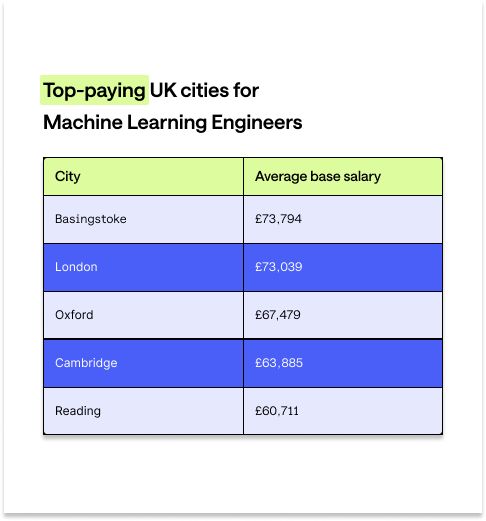
According to Indeed, the five highest-paying cities for Machine Learning Engineers in the UK are:
- Basingstoke
- London
- Oxford
- Cambridge
- Reading
Here’s a breakdown of the UK's top-paying cities for Machine Learning Engineers.
Machine Learning Engineer Job Requirements
Depending on the role, Machine Learning Engineers might need specific qualifications — a degree (or equivalent) qualification in computer science or statistics, for example. Still, many positions offer on-the-job training and development so that you can work towards a relevant qualification in the role.
A typical Machine Learning Engineer may have a background in programming, computer science, data science or another related field. Without this work experience, entry-level professionals should demonstrate a commitment to learning relevant skills.
To become a Machine Learning Engineer, you should have or be willing to develop the following skills:
- Mathematical understanding: Statistics, linear algebra and probability are critical in machine learning.
- Programming languages: You can use programming languages like Python, SQL (Structured Query Language) and Java for statistical analysis.
- Machine learning fundamentals: You can train accurate models using machine learning approaches and algorithms.
- Data analysis basics: You understand how to gather, clean, and organise raw data. You also have data visualisation skills.
- Business acumen: You know and use the entire machine learning process to meet business needs. You also use AI to drive business value and enhance your daily workflows.
Developing machine learning and AI skills in 2024
University can help you develop machine learning and AI skills. If you follow this path, you must choose a relevant degree or postgraduate qualification. Something like data science, computer science, or engineering would work. But this route is expensive — tuition fees alone cost up to £9,250 yearly.
Online learning through platforms like Coursera is another way to learn ML skills. This avenue offers flexibility around your existing commitments. But you may have to complete the work in your spare time. Plus, many online learning platforms don't provide accredited and industry-recognised qualifications. As such, you might stand out less in a competitive job market.
A professional apprenticeship with Multiverse, on the other hand, offers you the best of both worlds. You'll achieve an industry-recognised qualification. Then, depending on the programme, you can earn a degree equivalent. You'll also experience flexibility: learning in-demand skills through on-the-job training that fits around your work schedule.
These programmes can help you achieve your upskilling career goals, too. If you're already in a relevant role — say working as a Data Analyst — you can hone the skills needed to advance into machine learning. To top it off, apprenticeships are tuition-free. Not only will you save money, you'll make money by earning a salary as you learn.
Get paid to future-proof your career with Multiverse
Experts predict the market volume of the machine learning industry will grow from £126.30bn to £371.50bn by 2030. Those numbers suggest you could access more career opportunities — if you have the skills to meet future industry demand.
That said, specialists with machine learning skills are already in demand and well-compensated compared to most other professions. Long story short? There's never been a better time to future-proof your career by honing machine learning and AI skills.
A Multiverse apprenticeship programme is a tuition-free way for you to get started. As a Multiverse apprentice, you'll automatically gain access to the AI Jumpstart module — regardless of your programme.
The module caters to everyone. So, no matter where you are in your career, you'll learn foundational and future skills to stay ahead of the ever-changing digital landscape. And what's more, you'll get paid to do so.
Start or advance your machine learning career by completing our fast and simple application.
12 best jobs for introverts in 2025
Apprentices
Team Multiverse
But, how do you know if you’re an introvert or extrovert? This article will help you understand how to identify if you’re an introvert and explore some high-paying career options that could potentially suit you.
What is an introvert?
The psychologist Carl Jung invented the terms introvert and extrovert to describe two core personality types.
An introvert is a person who values and gets energy from internal reflection and quiet, calm environments rather than social interaction. It’s a misconception that introverts are shy or socially awkward.
Introverts can have excellent social skills, but unlike extroverts, they don’t get energy from interacting with others. After a lot of social interaction, they want to recharge with some alone time.
Introverts vs. extroverts: Skills, traits, and differences
While estimates vary, it's likely around 30-50% of us are introverts. Of course, you can have a mixture of introversion and extroversion, but most people identify with one more than the other.
A simple way to tell if you’re more introverted or extroverted is to consider how you feel at the end of a social event.
- Do you feel drained and eager to go home? You may be an introvert.
- Are you full of energy and planning for the next social event? You may be an extrovert.
Here’s a breakdown of the differences between introverts and extroverts to help you decide which careers fit your personality.

What makes a good job for an introvert?
Choosing a career that aligns with your personality can significantly impact your job satisfaction and overall well-being. For introverts, the ideal job often involves working independently or in small groups, with minimal constant social interaction. Introverts tend to thrive in roles with a clear structure and routine, allowing them to focus on individual tasks and projects. Jobs that offer flexibility and autonomy are also a good fit, as they enable introverts to manage their time and energy levels effectively.
Characteristics of introvert-friendly jobs
A good job for an introvert typically includes the following characteristics:
- Independent work: Introverts often prefer working alone or in small groups, with minimal supervision and interruptions. This allows them to concentrate deeply and produce high-quality work.
- Minimal group interactions: Since introverts tend to feel drained by large amounts of social interaction, jobs with limited group meetings and presentations are often a good fit. This helps them maintain their energy and focus.
- Focus on individual tasks: Introverts excel in roles that involve focused work on individual projects and tasks, with clear goals and deadlines. This allows them to leverage their strengths in problem-solving and attention to detail.
- Flexibility and autonomy: Jobs that offer flexible scheduling and autonomy are ideal for introverts, as they can manage their time and energy levels effectively. This flexibility helps them maintain a healthy work-life balance.
By seeking out roles with these characteristics, introverts can find a good job that aligns with their preferences and strengths, leading to greater job satisfaction and success.
15 best jobs for introverts who work independently
Introverts can perform well in any role. But, some careers have more opportunities for introverts to flex the skills that they excel at including:
- Problem-solving
- Analytical thinking
- Empathy
- Working independently
- Attention to detail
- Organisation
- Project management
Some of these roles are among the highest paying jobs, highlighting the financial benefits of pursuing such career paths.
In addition to being the best jobs for introverts, the following careers don’t always require a university degree. According to labor statistics, these jobs also offer competitive salaries and promising job growth.
You can pursue many of these through alternatives to university, including Multiverse apprenticeships.
(Note: the below salary data is sourced from London Glassdoor and United States Bureau of Labor Statistics job growth data.)
1. Data Scientist
Introverts who don’t mind math and analytical thinking might enjoy a Data Scientist career. Data Scientists require strong technical know-how to process and analyse data effectively. You’ll often need to communicate insights from your data analysis to leadership and stakeholders.
- Average salary: £54,115
- Job growth rate: 36%
- Similar job titles: Data Science Manager, VP of Data Science
2. Software Engineer
Many introverts choose the Software Engineer career path. It’s a high-paying job and you have opportunities to think about and creatively solve problems through coding. As a Junior Software Engineer, you’ll spend most of your time building applications and writing code.
As you move into leadership roles, you may spend more time communicating with clients or coaching other developers. Additionally, as Software Engineers advance in their careers, they may need to develop public speaking skills to present their work and collaborate with clients.
- Average salary: £66,813
- Job growth rate: 25%
- Similar job titles: Software Developer, Web Developer, Full Stack Developer, Back-End Developer, Front-End Developer.

3. Product Manager
Product Managers work closely with researchers, designers, and developers to create and manage products or features. They also need strong interpersonal skills to communicate with clients, stakeholders, and other teams. Part of the job is balancing customer needs and desires with business priorities.
Product Managers need strong organisational, project, and time management skills. They need to empathise with users and companies to solve problems. If you’re an introvert with those skills, it could be an ideal career for you.
- Average salary: £67,744
- Job growth rate: 9%
- Similar job titles: Industrial Production Manager, Product Owner, Solutions Manager
4. Data Engineer
Data Engineers are Software Engineers that focus solely on working with code and data. They typically work behind the scenes. Unlike Data Scientists, they don’t need to analyse data and present findings to executives.
To become a Data Engineer, you’ll need strong analytical skills and a database, analysis, and software engineering background. You’ll manage databases and may collaborate with Data Analysts and Scientists but will have the freedom to work alone often.
- Average salary: £51,159
- Job growth rate: 36% (based on Data Scientist projection from BLS)
- Similar job titles: Database Architect, Data Manager
5. Data Analyst
A Data Analyst career may also appeal to introverts because it requires skills like analytical thinking and problem-solving. Data Analysts spend most of their time working independently with data to solve real-world problems.
Multiverse’s advanced analytics apprenticeship can help you strengthen your data analysis skills and learn tools of the trade like Tableau.
- Average salary: £38,229
- Job growth rate: 23%
- Similar job titles: Data Scientist, Analytics Manager, Business Analyst
6. Content Marketing Manager
Content Marketing Managers help businesses grow by creating high-quality content for their target audiences. As a Content Marketing Manager, you’ll oversee the strategy and creation of content including blogs, landing pages, social media, or video. You may also manage teams of writers, editors, influencers, and content creators.
To succeed in this role, you’ll need strong analytical, writing, and editing skills. You’ll also need some communication and presentation skills, but most of the time you can take a behind-the-camera approach.
- Average salary: £43,918
- Job growth rate: 6%
- Similar job titles: Head of Content, Growth Marketing Manager, SEO Specialist
7. Cybersecurity Analyst
Introverts can apply their critical thinking and problem-solving skills to a cybersecurity career. Cybersecurity Analysts identify vulnerabilities in an organisation and implement measures to prevent cyberattacks.
Cybercrime evolves rapidly, so Cybersecurity Analysts must educate themselves continuously about the latest threats. As a result, this job may appeal more to introverts who enjoy solving complex problems.
- Average salary: £44,246
- Job growth rate: 33%
- Similar job titles: Information Security Analyst, Information Security Engineer, Penetration Tester, Cryptographer
8. Graphic Designer
Creative introverts often become Graphic Designers. As a Graphic Designer, you could create:
- Logos
- Social media templates
- Websites
- Brand books and guidelines
- Fonts
- Product packaging
Typically, Graphic Designers work with individual clients or small teams to develop and revise design ideas. However, they spend the majority of their workday creating art in solitude, often from the comfort of home.
- Average salary: £28,066
- Job growth rate: 2%
- Similar job titles: Graphic Artist, Digital Designer, Brand Designer
9. UX Designer
You might excel as a User Experience (UX) Designer if you’re an introvert that enjoys a mixture of focussed work time and group collaboration. It also helps if you have strong project management, design, and problem-solving skills.
As a UX Designer, you’ll audit and design websites and other applications to be user-friendly and accessible. UX Designers collaborate with product teams and other designers to create engaging user experiences.
- Average salary: £47,887
- Job growth rate: 8%
- Similar job titles: UX Manager, Digital Interface Designer, Information Architect
10. Cloud Engineer
Cloud Engineers usually gain expertise in specific cloud technologies like Amazon Web Services (AWS) and Azure. These make it possible for companies to share computing resources—databases, storage, software, and more—over the internet.
Cloud Engineers manage applications and data that live in the cloud. As a result, they often use programming languages like Python, PHP, Go, and Java.
- Average salary: £57,364
- Job growth rate: 11% (based on BLS “other computer occupations;” may be higher)
- Similar job titles: Cloud DevOps Engineer, Cloud Architect
11. Project Manager
Introverts who enjoy planning might consider becoming a Project Manager. Project Managers oversee teams and handle every step of project planning and execution. You can excel as a Project Manager by empathising, resolving conflicts, and motivating others to work toward a common goal.
- Average salary: £48,654
- Job growth rate: 7%
- Similar job titles: Project Administrator, Project Planner, Project Leader
12. Technical Writer/Technical writing
A Technical Writer translates complex ideas into accessible documents, such as instruction manuals, marketing plans, and white papers.
Introverts often perform well in this position because they can exercise creativity and dive deeply into research. Technical Writers spend most of their time planning, writing, and revising documents in solitude. Additionally, many people work remotely as freelance Technical Writers, which can provide even more freedom.
- Average salary: £43,088
- Job growth rate: 4%
- Similar job titles: Technical Communicator, Documentation Specialist, Content Strategist, Business Writer
Leveraging your skills and experience
Introverts often possess unique strengths and skills that can be highly valuable in various careers. By recognising and building on these strengths, introverts can find fulfilling and rewarding careers that cater to their preferences and work styles.
Building on introvert strengths
Some common strengths that introverts can leverage in their careers:
- Analytical skills: Introverts often excel in roles that involve data analysis, problem-solving, and critical thinking. These skills are highly valued in fields such as finance, research, and data science.
- Writing: Many introverts possess strong writing and communication skills, making them well-suited for careers ranging from technical writing, content strategy, and much more.
- Attention to detail: Introverts often have a keen eye for detail, making them well-suited for a range of careers.
- Independence: Introverts often prefer working independently, making them well-suited for careers in freelancing, consulting, and entrepreneurship. These roles offer the autonomy and flexibility that introverts thrive on.
By building on these strengths, introverts can find a fulfilling career path that aligns with their natural tendencies and skills, leading to greater job satisfaction and success.
Begin your career journey with Multiverse
If you’re interested in advancing your career, Multiverse can help you get started. As an apprentice, you’ll earn a salary, learn, and get a salary all without having to interrupt your current career.
Multiverse apprenticeships are free, but to be eligible, you must:
- Be at least 18 years old
- Have qualifications such as A-levels or NVQs
- Able to work in the UK
To get started, apply for a Multiverse apprenticeship. The Multiverse team will get to know you and reach out to discuss the best apprenticeship opportunities for you.
What is upskilling? Get paid to advance your career
Apprentices
Team Multiverse
Why does this matter? From the perspective of individual professionals, it means opportunity abounds to unlock a rewarding, lucrative career by harnessing the right new skills.
Individuals who engage in digital upskilling tend to earn more, experience increased job satisfaction, and progress further in their preferred career paths. Apart from these benefits, upskilling is becoming increasingly crucial to remain competitive in the job market throughout the next decade and beyond.
Interested in learning how you can future-proof your career without quitting your job? Then read on. Below, we'll cover the following:
- What is upskilling?
- Why is upskilling important?
- Benefits of upskilling
- How to Upskill in 2024
- Upskill with Multiverse and future-proof your career
What is upskilling?
Upskilling is the process of improving your professional skill set. It typically refers to the training involved when mastering new skills and technologies, such as tools, coding languages, or frameworks. The ultimate goal of upskilling is to broaden the depth of knowledge of your work, allowing you to take on more responsibilities and pursue career advancement opportunities.
Upskillers come from all ages and industries. They're usually professionals who want to progress in their current careers through continuous learning. Upskilling can be undertaken via structured learning on the job, studying and practicing on your own time, or a combination of the two.
Why is upskilling important?
Many companies undertake the task of training employees via dedicated upskilling programmes with the goal of developing more productive, innovative teams. But upskilling can also help employees themselves unlock significant economic and career benefits.
75% of employees who participate in an upskilling programme with Multiverse saw a salary increase since starting the programme.
Furthermore, research by The Department for Culture, Media and Sport (DCMS) shows upskilling is essential for job security. With 48% of UK businesses "recruiting for roles that require hard data skills,” the demand for employees with data skills is strong. Of the 48% of businesses surveyed, 46% have struggled to fill these roles over the last two years.
In other words: There aren't qualified workers to satisfy the spiking demand for next-generation digital skills at work.
Upskilling isn't just crucial for job security now. It will also help you future-proof your career over the next decade and beyond.
Take the fields of data analysis and AI as an example. DCMS data suggests the demand for data analysis will increase 33% by 2026. Meanwhile, Multiverse research suggests 81% of tech firm leaders expect to increase their investments in AI over the next three years.
Upskilling vs. reskilling: Understanding the difference
While both upskilling and reskilling aim to address professional skills gaps, they serve different purposes in professional growth:
- Upskilling: Focuses on enhancing and expanding existing skills within your current field to take on more advanced roles. For example, a marketing professional might upskill by learning advanced data analytics tools to create more impactful campaigns.
- Reskilling: Involves acquiring an entirely new set of skills to transition into a different role or industry. For instance, a retail worker might reskill to become a software developer by learning coding and programming languages.
Both strategies are critical for adapting to changes in the job market, whether you're looking to climb the ladder in your current career or pivot to a new one. Identifying your unique skill gaps will help you determine whether upskilling or reskilling is the right path for your goals.
For more information on whether upskilling or reskilling is right for you, check out our companion blog on the topic.
Benefits of upskilling
Those who upskill have the potential to earn more, excel in their career, and learn durable skills that can be applied on the job. Upskilling can future-proof your career, leading to greater job security, continuity, and satisfaction. Let's take a closer look.
Increase your income
According to AND Digital, more than a quarter of UK employees didn't receive promotions due to a lack of digital skills, and 10% missed a pay increase for the same reason. This highlights the importance of having the right skills for career advancement and earning potential.
1 in 3 professionals who upskill through Multiverse either received a promotion whilst on programme or within 6 months post-programme. Additionally, according to Multiverse’s ROI of AI report, 56% of workers receiving AI training are likely to negotiate for higher pay in the next 12 months.
Investing in your skills can directly impact your career progression and earning potential. You don't have to climb the career ladder in a traditional sense (i.e., advancing to management) to upskill and increase your salary. You can become a master in your field, progress to a senior specialist, and then command more money for your skill level.
As an example, consider the impact of seniority on Data Analyst salaries. The median Data Analyst in the UK is around £37,000. But Directors of Data Analytics with advanced skills and experience earn £95,000 on average before other incentives and bonuses. (Source: Glassdoor).
Experience job satisfaction
When you upskill, you can create meaning in your work. The increased purpose at work leads to higher engagement. According to Gallup, engaged employees are less likely to switch jobs, which indicates job satisfaction.
Job satisfaction is even likelier if you upskill in highly relevant areas to your existing role. For example, employees who feel their skills are irrelevant are ten times more likely to start job hunting. In this case, upskilling won't just mean more job satisfaction but more job continuity.
Increase your job security
As many as 85% of all jobs available in 2030 have yet to be invented, meaning they'll demand new skills. The future aside, 61% of businesses already feel limited "by an insufficient digital vision and strategy."
You need to upskill if you want to meet the existing demand and future-proof your career. Digital skills like data analysis and AI will be more in demand. Whether you upskill in these areas or in general, you'll likely experience more job security.
How to upskill in 2025
From choosing a goal to upskilling for free without quitting your job, here are five ways to advance your career in 2024.
Pick a goal
When upskilling, first define what you want from your work and life. Do you want a career that matches your interests? A role that offers work-life balance? Maybe you have a specific salary range in mind because you want to start a family.
Consider your answers carefully and use them to pick your goal. With your end goal in mind, you can plan and prioritise the steps needed. Plus, when you understand why you're upskilling in the first place, it's easier to stay focused — even if things get challenging.
Example:
Let's say your goal is to get a pay rise. You're currently a Junior Data Analyst. If you increase your skills, you'll be in a solid position to get a Senior Data Analyst role. That progression comes with a salary increase.
You choose to upskill through an Advanced Data Fellowship programme, which you can do alongside your work. You can get your promotion mid-way through the programme and meet your goal of a pay rise.
Research jobs of interest to you
If you know you want to upskill but need to clarify your end goal, do your research. Start with a brainstorming session and think about job titles, roles, or progression routes that appeal to you.
If you're unsure where to start, check out different career options for Upskillers and narrow down based on your interests. You can then research existing professionals in those fields through platforms like LinkedIn. That will give you an idea of what upskilling steps you need to take.
Example:
It's been a few years since you progressed from a Junior to a Senior Data Analyst. Your new career goal is a different role in a similar field. You remember a former colleague who pivoted from a Senior Data Analyst to a Business Analyst position.
The idea has always stuck in your mind, but you need help figuring out how to switch roles. You head to LinkedIn to revisit your old colleague's professional profile. You then double-check the skills and certifications they have that are relevant to their Business Analyst role.
Chat with someone in the field
One of the fastest ways to understand something is to talk with someone with real-life experience in that area. In the case of upskilling, this involves finding a mentor you can chat to about your next steps.
When you find a mentor, you can ask them how they went from A to B and what specific skills they need for their current role. If you don't have an existing colleague or professional in mind, consider joining professional communities or groups. You can find these groups on LinkedIn for free or join paid Professional Slack communities.
Example:
As a Senior Data Analyst considering a pivot into Business Analysis, you reach out to your old colleague through LinkedIn. You meet for a virtual coffee and learn how they pivoted from data analysis to business analysis. They upskilled with a Business Analyst apprenticeship and had a new role with higher pay in just over a year.
Start a project
A real-world project will help you practice and develop skills to meet your career goals. You could start a personal project in your own time or volunteer for a relevant project at work.
If you choose the latter, consider speaking to your Line Manager about your upskilling goals. They might have a relevant project you can get started on straight away. Doing this also keeps you top of mind for progression opportunities that match your career goals.
Example:
After researching your colleagues' professional skills and speaking to them directly, you're sure you want to become a business analyst. You have enough data analysis experience but never had to present your findings to stakeholders.
Your colleague mentioned that presentation skills are a critical difference between data and business analysts. So, you set yourself a personal project to practice your presentation skills. You decide to focus on presenting your data insights in a way that shows real-world business potential.
Upskill at no cost with Multiverse without quitting your job
Future-proof your career with Multiverse’s upskilling programme. This programme provides a structured curriculum and personalised coaching to help you achieve your unique career goals. You’ll develop versatile and transferable skills that enable you to adapt to changes in your industry.
Unlike other programmes, the upskilling certification has no opportunity costs. Our on-the-job training programme is designed to fit the schedules of busy working professionals so you can keep working full-time while you learn. It’s also totally free with no strings attached.
Upskill with Multiverse and future-proof your career
There’s never been a better time to upskill for the future. Emerging technologies like artificial intelligence, big data, and cloud computing are reshaping industries and driving innovation. Learning how to use these cutting-edge tools can help you keep up with the ever-changing digital landscape and advance your career.
Multiverse’s upskilling programmes are the ideal way to upgrade your toolkit without sacrificing your current career for costly formal education. We offer training in critical skills like advanced analytics and technology consulting. Our programmes will help you enhance efficiency, gain marketable skills, and save money. Get in touch today to learn more.
Future-proof your career: 5 skills you need to stay relevant in the age of AI
Apprentices
Katie LoFaso
Super-intelligent humanoid robots aren’t roaming the streets (at least, not yet). AI technology, however, is transforming industries and reimagining the way businesses operate. For workers, it’s also an inflection point — one that’s sparking a reevaluation of the skills needed to achieve staying power in a challenging job market. By 2027, an estimated 42% of companies surveyed by the World Economic Forum will prioritise training workers in AI and big data skills.
As AI becomes more integral to everyday operations, businesses need skilled workers to develop, train, and apply this technology. 81% of tech leaders plan to increase their investments in AI over the next three years.
This poses a massive opportunity for forward-thinking professionals to take charge of their career trajectory by learning high-value AI skills. According to a Multiverse report, 56% of surveyed workers at AI-integrated organisations plan to negotiate higher pay in the next 12 months.
Below, we’ll take a deep dive into the crucial AI skills and tools needed to thrive in the AI-enabled job market — both today and tomorrow. We'll also share practical tips and resources for expanding knowledge in these areas.
Understanding the LLM revolution
AI adoption has skyrocketed as organisations race to stay ahead of the competition. According to consulting firm McKinsey & Company, the percentage of businesses using AI tools jumped from 55% in 2023 to 72% in 2024. With 50% of organisations already using AI for two or more business functions, it’s clear that this isn’t just a momentary trend; it’s a seismic shift in how we work.
The versatility of AI tools has significantly contributed to their surging popularity. Many businesses rely on this technology to automate repetitive or time-consuming workflows. In the healthcare industry, for instance, professionals are using AI to automate document classification, patient indexing, and other data entry tasks. Meanwhile, marketing and sales teams are turning to AI to hyper-personalise content and automatically send follow-up emails to prospects.
Beyond automation, businesses across industries are employing AI to analyse data and make more strategic decisions. For example, Schneider Electric’s Sustainability Business uses AI-assisted forecasting tools to predict extreme weather events. As Schneider Electric Sustainability President Steve Wilhite explains, “These forecasts, partnered with human-expertise, will support everything from energy efficiency and optimisation to emissions reduction to grid resiliency.”
Despite the massive gains, even the most AI-savvy businesses have struggled to unlock the technology’s full potential. Only 27% of business leaders consider their organisations “AI Adept,” which means they’ve embedded AI across their operations to improve strategic decision-making.
“All organisations should strive to be AI native — fully embedding and realising the ROI advantages of AI — in the years ahead,” explains Anna Wang, Head of AI at Multiverse. “However, because of the newness of the technology and the pace of change, many organisations are struggling to get a clear view of their own progress.”
For workers and organisations, understanding the tools and technologies leading the AI revolution — and how to leverage them to drive demonstrable business value — is essential. Below, we’ll highlight three key technologies gaining traction in workplaces in the UK and beyond.
ChatGPT
In November 2022, OpenAI launched ChatGPT, an AI-powered conversational model that quickly became a household name. By August 2024, the company estimated that an astonishing 200 million people were using the tool weekly.
ChatGPT is a large language model (LLM) trained on vast amounts of data. Developers create LLMs using neural networks that contain interconnected nodes and layers. These structures learn how to process and transmit data, just like neurons in the human brain.
ChatGPT’s neural networks use natural language processing to understand and respond to human language. The LLM breaks down text into patterns and smaller components, analysing it for meaning and context. It uses this information to generate relevant responses that closely mimic human writing or speech.
The conversational nature of ChatGPT makes it incredibly accessible, contributing to its widespread popularity. According to the ROI of AI report, 61% of workers have picked up new AI skills by experimenting with ChatGPT.
Text-To-Image Generators
Generative AI tools like MidJourney and DALL·E 3 use advanced machine learning techniques to create images from text prompts. Unlike ChatGPT, which is powered by LLMs designed for text generation, these platforms rely on diffusion models or other image-generation architectures. Diffusion models work by adding “noise” (random pixels) to data, such as images, and then gradually removing noise through multiple iterations to generate new images based on the text prompt.
Businesses can use image-to-text generators like Midjourney to generate personalised images in a fraction of the time it takes to create traditional art. This technology also helps professionals brainstorm new content ideas, such as film posters and social media graphics.
London-based ad agency 10 Days is one company that has embraced text-to-image generators. Their creative team uses these tools to design visually complex brand characters, logos, packaging, and picture books.
GitHub Copilot
GitHub Copilot is an AI-powered programming assistant built on an LLM. It allows users to input code snippets and generates suggestions to complete them. The software also answers coding-related questions, detects bugs, translates code into different programming languages, and more.
According to Stack Overflow’s 2024 Developer Survey, 44.2% of professional developers use GitHub Copilot for programming tasks. This tool lets professionals write code more quickly and accurately, significantly improving efficiency. A GitHub study found that developers who used Copilot completed coding tasks 55% faster than those who didn’t use this tool.
According to payments startup Pockyt founder Mason Lin, this achievement is only the beginning of a larger digital transformation for the startup.
“We anticipate a 500% increase in productivity in the medium to long term as we continue adapting AI and fine-tuning our software development life cycle,” Lin says.
AI and job growth: The path to a resilient career
As more businesses embrace AI, many professionals are understandably curious about how it will affect their careers. While it may take decades to understand the full impact of these advancements, one thing is certain: AI is fundamentally reshaping the workforce.
By 2030, generative AI and similar technologies may automate up to 30% of current working hours. This shift could require up to 12 million Europeans to transition into new roles — twice the pre-pandemic rate.
But it’s not all doom and gloom. AI is unlocking exciting new job opportunities across all sectors. A 2024 Gartner survey revealed that 67% of mature organisations are developing positions related to generative AI.
The UK job market already reflects the growing influence of AI. According to a PwC report, AI-related job postings have increased 3.6 times faster than other positions. The report also found that UK employers are willing to pay a 14% wage premium for workers with AI skills — a clear indication of the value of skilled human operations in workplaces increasingly fueled by AI-driven insights.
“Skilled people are crucial to realising the full value of AI,” explains Gary Eimerman, Multiverse’s Chief Learning Officer. “Without a thorough understanding of AI, businesses may be limiting the value derived from the technology in the long-term.”
The UK government has developed several initiatives to support AI skill development. For instance, the Digital Skills Council offers resources to help workers reskill and upskill for digital careers. Additionally, the Secretary of State recently appointed tech entrepreneur Matt Clifford to spearhead the AI Opportunities Action Plan. This project will outline strategies to develop AI talent in the private and public sectors.
Expanding your AI skills now will help you get ahead of the curve and navigate the coming technological disruptions. Upskilling can also prepare you for emerging AI careers, such as:
Digital Transformation Consultant
A Digital Transformation Consultant helps businesses use AI and other technologies to automate workflows and drive innovation. They assess each client’s existing tech stack and develop a strategic plan for integrating new technologies.
Salary data:
- Entry-level: £41K
- Average: £60K
- High earners: up to £74K
Source: Glassdoor
AI Compliance Officer
An AI Compliance Officer oversees their organisation to make sure all employees use AI tools and data ethically and legally. They develop policies for AI usage, educate workers about best practices, and audit AI systems.
Salary data:
- Entry-level: £27K
- Average: £33K
- High earners: up to £50K
Source: Talent.com
Automation Consultant
An Automation Consultant identifies opportunities to develop more efficient and streamlined operations. They use AI software and other tools to automate workflows, from sending appointment reminders to ordering supplies.
Salary data:
- Entry-level: £35K
- Average: £47K
- High earners: up to £63K
Source: Glassdoor
Future-proofing your career: The 5 skills you need to stay relevant in the age of AI
The rapid adoption of AI technologies has led to a nationwide talent shortage. In 2024, 81% of UK IT managers agree that there’s a critical AI skills gap, an increase of 9% from the previous year.
A lack of education and few opportunities for hands-on practice have contributed to this growing skills gap. According to Multiverse data, only 45% of employees received formal training from their employers.
“Workers are fending for themselves, either funding their own AI training or learning through trial and error,” Wang says. As a result, “it is difficult for them to self-assess their own knowledge gaps and learn most efficiently with their limited time.”
Fortunately, there are plenty of resources to help you learn AI concepts and expand your digital toolbox. Here are the most critical skills needed for success in the AI-enabled workplace.
1. Prompt engineering
Prompt engineering involves writing and refining specific inputs to get more accurate and tailored outputs from generative AI tools. According to Multiverse data, only 14% of tech leaders believe their organisation lacks this skill — a testament to the primacy of prompt engineering in the hierarchy of foundational AI skills.
Whether using ChatGPT or other generative text tools, workers can deploy numerous strategies for writing effective AI prompts. These include:
- Providing necessary context, such as your desired tone, industry, and target audience
- Using roleplay prompts, like “Imagine you’re an experienced UX Designer who wants to create user-friendly features for a mobile app”
- Giving the AI a list of “do’s” and “don’ts”
- Inputting an example and ask the AI tool to model its response after it
- Experimenting with different versions of the prompt until you get the desired output
Prompt engineering allows professionals to generate more engaging and precise content. For example, a Data Analyst could use prompt engineering to create a detailed report highlighting actionable insights based on specific findings. Meanwhile, a Software Developer could prompt an AI tool to review code output for a new feature.
Taking an online course in natural language processing can help you learn how to develop better prompts. Experimenting with free tools like OpenAI’s Playground will also sharpen your skills.
2. Data analysis
Employees spend an average of 14.31 hours weekly — over 30% of their time at work — on data tasks. Yet Multiverse survey data found data analytics to be the biggest AI skill gap organisations face, with 52% of tech leaders and workers agreeing their businesses are lacking in this area.
You don't need a degree in data science to learn this skill. Accessible AI-powered tools like Microsoft Power BI and Tableau make collecting, processing, and analysing data easier than ever. They also allow users to create engaging data visualisations and reports.
Let’s say a Marketing Specialist wants to improve their social media campaigns. They could use Tableau to collect engagement data from Instagram and analyse it for trends. For example, they may discover that videos with music consistently perform better than posts with photographs. Based on this insight, they can create similar content to capture their audience’s attention more effectively.
Tableau and Power BI offer many free resources — including tutorials and community forums — to help you strengthen your data analytics skills.
3. Identifying AI workflows and implementing AI-related projects
While there are many useful AI tools, it can be difficult to weave them into your company’s existing workflows. Multiverse data shows 48% of tech leaders think their organisation can’t execute AI projects effectively.
Creating a project roadmap will help you spot opportunities and implement AI tools successfully. This framework should include these steps:
- Assess existing workflows to understand your organisation’s challenges and needs
- Identify areas where AI tools can provide advantages over conventional methods
- Form cross-functional teams that bridge data science, software development, and other departments
- Create clear guidelines for AI usage and data governance
- Rollout AI systems gradually to prevent disruptions
- Establish performance metrics to make sure your project is on the right track
4. Building AI features
Developing AI features is another critical skill gap identified by 26% of tech leaders and workers, according to the Multiverse ROI of AI report. This skill requires a basic understanding of machine learning algorithms and data analytics.
Luckily, you don’t have to start from scratch while creating AI features. Tools like PyTorch and TensorFlow offer libraries and extensions that simplify the process of building and training machine learning models. Software developers can use TensorFlow’s LiteRT library to integrate machine learning models into Android and iOS applications.
You don’t need a software engineering background to contribute to these projects. Low-code platforms like Microsoft Power Apps have intuitive, user-friendly tools that anyone can use to build AI features.
5. Ethics and responsible AI usage
The vast majority (93%) of workers surveyed by Multiverse believe they use AI ethically. But AI technology raises many ethical and legal challenges that aren’t always immediately apparent.
A 2024 study by the University of Essex discovered that AI hiring systems can “create algorithmic bias against women” by filtering applications based on gendered language. Along with bias, data privacy is another significant concern. Notably, Google faced a class-action lawsuit for using patient data from the Royal Free NHS Trust without consent to train its AI models.
AI ethics frameworks can help you navigate tricky situations and adhere to data privacy laws. The UK government has developed ten principles to guide the ethical use of generative AI, prioritising accountability, human control, and transparency. Similarly, the European Union created a human-centric framework for ethical AI usage.
Improving AI skills: Challenges and opportunities
Strengthening your AI skills takes effort, time, and the willingness to step outside your comfort zone. Taking advantage of online resources and seeking guidance from mentors will help you navigate the learning curve. Here are three options for levelling up your AI skills.
Completing self-taught courses
Many organisations have developed online courses that let you study artificial intelligence at your own pace. For example, AWS and Coursera offer classes on machine learning, natural language processing, and other AI fundamentals.
These courses are a convenient way to learn foundational AI skills while focusing on the areas most relevant to your professional development. However, they typically don’t offer personalised coaching or opportunities for hands-on practice.
Going back to school full-time
Some upskillers return to university to earn degrees in artificial intelligence, computer science, information technology, and related fields. These programmes have structured curricula and may offer experiential learning opportunities like group projects and internships.
But the cost of going back to school can be high. College students in England pay up to £9,250 annually in tuition, plus living expenses and other fees. And that’s not factoring in the lost wages from time spent studying instead of working, which can add up quickly over the course of a degree.
Learning on the job
Multiverse’s upskilling programmes provide a unique opportunity to learn artificial intelligence skills on the job. We offer 12 to 18-month programmes in AI, data analytics, and other tech disciplines — none of which require you to leave your current role to participate in.
Our AI-Powered Productivity programme empowers you to use generative AI tools to boost efficiency and output. You’ll learn how to integrate Microsoft 365 Copilot and other cutting-edge platforms in your everyday workflows. The course also covers crucial topics like AI ethics, data privacy, and performance metrics.
The AI for Business Value programme focuses on using artificial intelligence to spark innovation and optimise processes across the business. It combines AI fundamentals with business analysis skills, giving you the tools to drive organisational change. Plus, you’ll learn how to communicate the business impact of AI initiatives to non-technical stakeholders.
This modern approach combines the flexibility of online learning with the opportunity to receive personalised feedback from our dedicated instructors.
Unlike university and bootcamp students, you won’t have to pay a hefty tuition bill or reduce your earning potential. Our upskilling programmes are funded entirely by your employer, and you’ll keep earning a salary while you learn.
Stay competitive with in-demand AI skills
The AI revolution is already in full swing, and the job market is evolving at lightning speed as employers scramble to keep up. In this competitive environment, upskilling early can help you gain a head start and seize exciting — and potentially lucrative — career opportunities in data analytics, AI consulting, and other areas.
As Anna Wang, Multiverse Head of AI, observes, “It’s time to get employees up to speed on AI to even the data skills playing field and give individuals the opportunity to accelerate their careers.”
Multiverse’s upskilling programmes are the only way to gain AI mastery while earning a salary. You’ll study critical AI concepts and start applying your skills in the workplace from day one. Explore our AI for Business Value and AI-Powered Productivity programmes for more information, or fill out our quick application to get started today.
How much maths is involved in data science?
Apprentices
Team Multiverse
Let’s take a closer look at how professionals use maths for data science and how much you’ll need to know to pursue a career in this exciting field.
How do Data Scientists use maths?
A Data Scientist's primary role is to mine, examine, and make sense of data. Maths plays a role in each of these stages.
Data Scientists use mathematical skills to:
- Understand and use machine learning algorithms
- Analyse datasets from various sources
- Identify patterns in data
- Forecast trends and growth
Data Scientists also use mathematical functions to perform data analysis and apply machine learning techniques like clustering, regression, and classification.
Clustering
Clustering is a way to organise data into clusters or groups that share similarities with each other. It involves some calculus and statistics. A clustering algorithm organises data into these groups to identify trends and reveal insights at the surface level.
For example, a company with a large customer base can use clustering to segment customers based on their demographics or areas of interest. When you are promoting products, you can better personalise your marketing messages based on data points like customer location, behaviour, interests, and more.
Regression
Regression analysis is a way to measure how certain factors impact outcomes or objectives. In other words, it shows how one variable impacts another. It uses a combination of algebra and statistics.
Data Scientists use regression to make data-driven predictions and help businesses make better decisions. For example, they can use regression to forecast future sales or to predict if a company should increase the inventory of a product.
Classification
Data classification is the process of labelling or categorising data to easily store, retrieve, and use it to predict future outcomes. In machine learning, classification uses a set of training data to organise data into classes. For instance, an email spam filter uses classification to detect if an email is spam or not.
Foundations of data analysis
All data professionals need a solid grasp of essential mathematical concepts, but that’s only part of the skill set needed to analyse data effectively. The ability to work with diverse types of information and create data visualisations are also crucial for gaining meaningful insights.
Working with different data types
Data Analysts and Data Scientists handle a wide range of data types, including:
- Categorical data: Qualitative information that can be represented by a name or symbol, such as customer demographics and types of products
- Numerical data: Quantitative information, such as conversion rates and sales revenue
You should know how to use Structured Query Language (SQL) to manage categorical and numerical data. This language allows you to query, organise, and filter information in relational databases.
Data visualisation
Data Scientists often transform datasets into accessible graphic representations. These visualisations can reveal previously unnoticed patterns or anomalies in datasets. They also allow data professionals to communicate their findings with non-technical stakeholders.
Platforms like Microsoft BI and Tableau use machine learning models and mathematics to analyse data. They also have intuitive interfaces that allow you to design interactive dashboards and data visualisations. For example, you could use line graphs to represent economic trends over time.
You should also learn how to use data visualisation libraries in Python. Popular frameworks include Gleam, Matplotlib, and Plotly. They have built-in templates and themes that you can use to create polished visualisations quickly.
What types of maths do Data Scientists need to know?
Luckily, you don’t need to be a mathematician or have a Ph.D. in mathematics to be a Data Scientist. Data Scientists use three main types of maths—linear algebra, calculus, and statistics. Probability is another maths data scientists use, but it is sometimes grouped together with statistics.
Linear algebra
Some consider Linear Algebra the mathematics of data and the foundation of machine learning. Data Scientists manipulate and analyse raw data through matrices, rows, and columns of numbers or data points.
Datasets usually take the form of matrices. Data Scientists store and manipulate data inside them and they use linear algebra during the process. For example, linear algebra is a core component of data preprocessing. It’s the process of organising raw data so that it can be read and understood by machines.
At a minimum, Data Scientists should know matrices and vectors and how to apply basic algebra principles to solve data problems.
Calculus
Data Scientists use calculus to analyse rates of change and relationships within datasets. These maths skills help them understand how a change in one variable — such as changing customer preferences — affects another variable, like sales revenue.
Before you begin your data science journey, you should master the two main branches of calculus: differential and integral.
Differential calculus
Differential calculus studies how quickly quantities change. Data Scientists should learn its foundational concepts, including limits and derivatives. Python libraries like NumPy and SymPy can speed up this learning process by performing complex calculations efficiently.
Data professionals apply differential calculus to optimise machine learning models and functions. For instance, gradient descent calculates the error between the predicted and actual results. This method allows neural networks and other types of algorithms to adjust their parameters iteratively, reducing errors and improving performance.
Integral calculus
Integral calculus analyses the accumulation of quantities over a specific integral. To effectively apply this technique, you must understand definite and indefinite integrals. Familiarity with Python libraries like SciPy can also help you calculate integrals.
Data professionals use this branch of mathematics to solve many problems in data science, such as forecasting the demand for a product and analysing revenue. Machine learning algorithms also use integral calculus to calculate probability and variance.
Probability and statistics
Probability and statistics go hand in hand. Data professionals use these mathematical foundations to analyse information and forecast events.
Statistics is the branch of mathematics that collects and analyses large data sets to extract meaningful insights from them. Data Scientists use statistics to:
- Collect, review, analyse, and form insights from data
- Identify and translate data patterns into actionable business insights
- Answer questions by creating experiments, analysing and interpreting datasets
- Understand machine learning and predictive models
Here are a few examples of statistics principles you’ll need to know to break into the data science field:
- Descriptive statistics - Analyses a dataset to summarise its main characteristics, like mean and mode
- Inferential statistics - Extrapolates from known data to make predictions or generalisations about a larger population
- Linear regression - Predicts the relationship between an dependent variable and two or more independent variables
- Statistical experiments - Know how to create statistical hypotheses, do A/B testing and other experiments, and form conclusions
In contrast, probability is the likelihood that an event will occur. Data professionals use this method to analyse risk, forecast trends, and predict the outcomes of business decisions.
Data Scientists need to know these basics of probability:
- Distributions - Summarizes all the possible values in a dataset and the frequency with which they occur
- Statistical significance - Measures the likelihood that a relationship or result isn’t random
- Bayes' Theorem - A mathematical formula used to calculate the likelihood of an event based on prior knowledge and the probabilities of related events
- Hypothesis testing - Determines whether your assumptions about a particular population or dataset are supported by evidence
- Probability theory - Calculates the likelihood of different outcomes of random events or uncertain situations
Keep in mind that how much maths you need to know may also depend on your role. For example, a junior Data Analyst focuses more on analysing trends. Although they still need to know how to extract data and interpret information, they work less with complex mathematical concepts. Unless they need to work with machine learning algorithms, they’ll use maths for data science less than a senior-level Data Scientist.
This is more of an introduction than an exhaustive list of how much maths is involved in data science. If you are interested in learning data science and the maths that Data Scientists use, Multiverse offers a Data Fellowship and a Data & Insights for Business Decisions program.
Data Scientists roles: salary, job titles, and more
Modern businesses generate and collect enormous amounts of data, such as financial transactions, healthcare records, and social media posts. They need workers with hard data skills to analyse this information effectively and support data-driven decision-making.
In the UK, the surging demand for data professionals has far outpaced the available workforce. A study commissioned by the Department for Digital, Culture, Media and Sport found that UK businesses are seeking to fill 178,000 to 234,000 roles requiring hard data skills. However, 46% of the surveyed companies reported difficulty finding qualified candidates within the last two years.
This talent shortage has led many UK businesses to offer competitive salaries and other perks. According to Indeed, the average salary for Data Scientists in the UK is £51,000. To attract candidates with specialised data skills, employers may also offer hybrid or remote arrangements, generous leave policies, and additional benefits.
Professionals often begin their careers as junior Data Scientists or Analysts, but this field has many opportunities for advancement. Here are three job titles you could pursue as you gain experience:
Senior Data Scientist
A Senior Data Scientist leads long-term projects and supervises Junior Data Scientists. They also communicate findings to stakeholders and guide data-driven decision-making. For instance, a Senior Data Scientist might use machine learning algorithms to detect fraud and help business leaders develop new cybersecurity policies.
Salary:
- Starts at - £61,000
- Average base salary - £73,000
- Top earners make up to - £87,000
Source: Glassdoor
Machine Learning Engineer
A Machine Learning Engineer builds, deploys, and maintains machine learning applications. They use maths and data science to design and train machine learning models.
Salary:
- Starts at - £41,000
- Average base salary - £55,000
- Top earners make up to - £73,000
Source: Glassdoor
Data Architect
A Data Architect designs and maintains data structures, databases, and data pipelines. They’re responsible for integrating data from different sources so data flows smoothly throughout their organisation.
Salary:
- Starts at - £55,000
- Average base salary - £68,000
- Top earners make up to - £85,000
Source: Glassdoor
Boost your skills with comprehensive Data Scientist training
A strong understanding of maths is essential for machine learning and data science roles. It can help you solve problems, optimise model performance, and interpret complex data that answer business questions.
You don’t need to know how to solve every algebraic equation — Data Scientists use computers for that. However, you should become familiar with the principles of linear algebra, calculus, statistics, and probability. You don’t need to be an expert mathematician, but you should broadly enjoy maths and analysing numbers to pursue a data science career.
Multiverse’s Data Fellowship and Data & Insights for Business Decisions programs can help you learn the basic maths concepts you need to know. However, the focus is on how to apply those maths skills in data science.
The Data Fellowship guides you through the fundamental principles of data analysis, including identifying and solving real world problems with data. Our modules cover advanced analytics and statistical methods, data visualisation, data management, and other critical topics. You’ll sharpen your skills by participating in data analysis and statistics hackathons.
The Data & Insights for Business Decisions program teaches you how to transform raw data into meaningful insights. You’ll learn how to use popular data analytics tools — including Excel and PowerBI — to clean and manipulate data. The program also teaches you how to tell compelling stories with data and foster a data-driven culture in your organisation.
Upskillers don’t pay for tuition — programs are free. You actually get paid to work in a data role and learn while you complete the program. You’ll also start immediately applying your new skills by working on real projects for your employer, accelerating the learning process.
The first step is to apply here. If accepted, you’ll start learning data science and get on-the-job training at a company that pays you for your time.
Sorry, no results found.