











We couldn’t find what you are looking for. Please try another way.
Apprentices
Thank you! Your submission has been received!
Oops! Something went wrong while submitting the form.
The 10 best jobs for the future, and how to get them
Apprentices
Team Multiverse
AI's rapid popularity surge and adoption has already created entirely new career paths. For instance, AI Ethics Specialists help companies use this technology responsibly, while AI Engineers and AI Product Managers develop AI applications. And as more organisations invest in this tool, new positions will continue to emerge.
Many people worry that the widespread adoption of AI will replace human labour. Data from consulting firm McKinsey indicates the number of ads for jobs with high risk for AI disruption has dropped 38% between 2022 and 2025 compared to just 21% for those with low AI exposure. But that doesn’t mean UK workers should lose hope for gainful employment in the future. Instead, upskilling and preparing to work with emerging technologies can help you future-proof your career and stay relevant in the changing job market.
Below, we explore 10 jobs with growth potential in an AI-enabled future.
Job 1: Data Analyst
A Data Analyst gathers, processes, and interprets data to gain meaningful insights. Companies use these conclusions to make strategic decisions and predict future trends.
Data Analysts rely on some of the following key skills:
- Programming languages - Data Analysts often use Python and R to process and visualise data
- Data collection - Gather information from various sources, such as documents, spreadsheets, and customer surveys
- Statistical analysis - Use different statistical techniques to interpret data and uncover trends
- Communication - Share results with clients, managers, and key decision makers
- Collaboration - Work in cross-functional teams with Data Scientists, Project Managers, and other specialists
Looking to take the next step in your data career? Explore Multiverse's programmes for date professionals to learn how to make the connections between data and business insights that will help you prepare for mid and senior-level roles.

Job 2: Software Engineer
A Software Engineer develops, deploys, and tests software solutions. Depending on the nature of their role, they may participate in every step of the software development lifecycle, from design and development to maintenance.
Software engineering is a broad field with many specialisations. For example, App Developers produce mobile applications for smartphones and tablets. Web Developers design the front and back ends of web apps and websites.
Essential skills for a Software Developer include:
- Programming languages - Write the code for software programmes with JavaScript (web apps), C++ (video games), Kotlin and Swift (mobile apps), and other languages
- Front-end web development - Use HTML, CSS, and JavaScript to design stylish and accessible user interfaces
- Source control management - Track changes to the software’s code and collaborate on projects remotely
- Debugging - Diagnose and fix programming errors
- Encryption - Use algorithms and encryption techniques to protect user information
Are you a Software Engineer? Learn advanced skills and prepare for more senior-level roles with Multiverse’s Advanced Software Engineering programme.
Job 3: Digital Marketing Specialist
A Digital Marketing Specialist advertises brands, products, and services online. They use digital tools to identify and reach their target audiences. For instance, they may create social media posts and email newsletters to promote a new service.
Digital marketing has become an invaluable tool in all industries. In 2025, online marketing made up 80% of the advertising spend in the UK. This competitive landscape has led to an increased demand for skilled Digital Marketing Specialists.
Some foundational skills for Digital Marketers, depending on specialisation, include:
- Search engine optimization and Generative Engine Optimization (SEO and GEO) - Create high-quality, optimised content that ranks at the top of search results in both search engines and AI platforms
- Content creation - Develop compelling and valuable content that attracts audiences, such as blog posts, infographics, and videos
- Social media marketing - Use Facebook, Instagram, and other social media platforms to engage customers and generate leads
- Marketing automation - Build automated workflows and personalise marketing content with platforms like HubSpot and Mailchimp
Job 4: AI and Machine Learning Expert
Artificial intelligence is a burgeoning field across numerous industries, from agriculture to transportation. Companies use this technology to generate content, automate tasks, power autonomous vehicles, and more.
As more companies leverage this tool, the demand for AI and Machine Learning (ML) Experts has soared. In January 2024, 27% of tech jobs advertised in the UK were AI-focused positions. Additionally, almost 90% of business leaders expect all employees will need basic AI training in the coming years.
AI and ML Experts need expertise in these areas:
- Coding - Popular languages for programming AI applications include Python, Java, Julia, and C++
- Machine learning - Use supervised and unsupervised learning techniques to teach ML models how to detect patterns and make predictions
- Mathematics - Use calculus, statistics, and other mathematical concepts to build algorithms and models
- Natural language processing - Create applications that recognize, understand, and respond to spoken or written human language
Gain proficiency in these areas with Multiverse’s best-in-class programmes dedicated to growing AI/MLskills, including AI for Business Value, the AI and Machine Learning Fellowship, AI Powered Productivity, and more. Learn how to harness AI to drive business growth and innovation — all for free when your employer partners with us.
Job 5: Cybersecurity Analyst
The UK cybersecurity market is expected to grow 10% in 2025, reaching a total revenue of £9.42 billion, according to Statista.
Cybersecurity jobs require these skills:
- Intrusion detection - Use cybersecurity software to monitor networks and detect suspicious activity
- Incident response - Isolate compromised systems and use mitigation techniques to stop cyberattacks
- Cryptography - Develop protocols to stop cybercriminals from accessing confidential data
- Communication - Prepare security reports and educate colleagues about cybersecurity best practices

Job 6: UX/UI Designer
A User Experience/User Interface (UX/UI) Designer creates user interfaces for apps, websites, and other tech products. They increase user satisfaction by designing accessible and visually appealing interfaces.
Here are three must-have skills for a career in UX/UI design:
- Prototyping - Develop simulations or models of the final product to test with users
- Usability testing - Conduct research to see how real users interact with the product and refine your design accordingly
- Collaboration - Collaborate with Software Developers, Product Managers, and other professionals to develop products
Job 7: Cloud Solutions Architect
Cloud computing has become an integral part of the digital world. This shift has raised the demand for Cloud Solutions Architects, who design and manage cloud-based infrastructure.
Here are a few basic requirements for Cloud Solutions Architects:
- Network knowledge - Understand how cloud-based networks transmit and receive information
- Cybersecurity - Safeguard cloud infrastructure and applications with access controls, encryption, and other techniques
- Coding - Most Cloud Solutions Architects use Java, Python, and C++ to develop cloud infrastructure
Prepare for future jobs in cloud computing with Multiverse’s Software Engineering programme. You’ll learn foundational computer science concepts and become proficient in top coding languages. Our electives also let you develop expertise in cloud engineering, cybersecurity, or a related field.
Job 8: Blockchain Developer
Blockchain technology uses cryptography to verify transactions and create secure, unchangeable records. Companies use this technology to process payments and protect intellectual property.
Blockchain Developers design, build, and manage blockchain applications and platforms. This career path requires proficiency in these areas:
- Blockchain architecture - Understand the components of blockchain systems, including blocks and Distributed Ledger Technology
- Programming - Blockchain Developers typically use C++, JavaScript, and Ruby to build systems
- Cryptography - Use cryptography protocols to encrypt and decrypt information
Job 9: Internet of Things (IoT) Engineer
The Internet of Things (IoT) landscape has expanded rapidly in the last few years. These physical devices transmit information to an interconnected network of other objects and the cloud.
The growth of IoT has led to an explosion of jobs. An Internet of Things Engineer designs and develops IoT ecosystems and devices.
IoT engineering jobs require many skills, including:
- Computer-aided design - Use AutoCAD and other software to design the physical hardware components of IoT systems
- Software development - Create applications to control and monitor IoT devices
- UI/UX design - Use UI/UX design principles to develop easy-to-navigate IoT solutions
Job 10: Sustainability Officer
UK businesses will increase spending on sustainability by 260% between 2018 and 2030. As more companies invest in the environment, the demand for Sustainability Officers has grown.
Sustainability Officers develop and oversee sustainability initiatives. They also make sure businesses comply with relevant environmental regulations.
Key skills for Sustainability Officers include:
- Reporting - Document and share sustainability efforts
- Stakeholder engagement - Build partnerships with managers, employees, regulatory agencies, and other stakeholders
- Communication - Discuss the company’s sustainability practices with internal and external stakeholders
Step into the future with Multiverse’s apprenticeships
As technology develops, new professions will emerge to address the evolving needs of businesses and customers. The best jobs for the future combine cutting-edge technology with transferable skills that will help you continuously adapt.
Prepare for the ever-evolving job market with a Multiverse apprenticeship. Our programmes equip apprentices with the knowledge and skills needed to excel in the rapidly changing work landscape. You’ll receive hands-on training, one-on-one mentorship, and a structured education to help you succeed in your current and future jobs.
Complete our quick application today for current professionals and the Multiverse team will get in touch to discuss the next steps.

Mastering change management in the age of AI: A guide for professionals
Apprentices
Katie LoFaso
Needless to say, things have changed almost overnight. Between 2023 and 2024, the percentage of organisations using AI leapt from 55% to 78%. This rapid adoption isn’t surprising when you consider the technology’s impressive versatility. From crunching huge datasets to managing projects, AI can assist with (almost) any operation.
But incorporating AI into your daily workflows isn’t as simple as downloading Microsoft Copilot onto every computer or sharing tutorials about AI image generation. Companies that adopt this technology can face many obstacles, from tight budgets to employee resistance. Effective change management is key to navigating these transformations successfully and getting your whole team on board.
This article covers essential strategies and resources for change management. By mastering this skill, you can help your organisation adopt AI and prepare for whatever comes next.
Understanding change management
The Association for Project Management defines change management as “the overarching approach taken in an organisation to move from the current to a future desirable state using a coordinated and structured approach in collaboration with stakeholders.”
In other words, change management helps individuals and organisations transition from one point to another as smoothly as possible. For example, a business might develop a change initiative to shift from barely dabbling in AI to fully embedding it in every part of its operations.
To outsiders, change management may seem a little over-the-top. Even unnecessary. After all, companies change things all the time — do you really need a special plan for it?
Absolutely, especially when you’re introducing new technologies or processes. Here are a few reasons why it pays to manage organisational change proactively:
- Improve communication: Even the most laid-back employees can feel stressed if you suddenly switch to a new system or tool. With a change management plan, you can keep everyone in the loop about the transition and help them understand their roles.
- Get employee buy-in: Employees often balk at change, especially if they believe it will create more work for them. Some workers may also fear that AI will eventually replace them, leading to anxiety or resentment. Change managers can help soothe these concerns by explaining the benefits of the new technology upfront. For example, your HR team’s resistance to change may evaporate when you demonstrate how AI can automate their scheduling tasks.
- Provide training: While some AI tools are intuitive, they all have a learning curve. Content generators, for instance, require careful prompting to get high-quality outputs. By planning ahead, you can help employees upskill and get comfortable with the software before it becomes part of their daily routines.
- Reduce disruptions: Launching a new tool without a plan is a surefire way to cause chaos and confusion. A structured approach enables you to introduce the transition gradually and troubleshoot any issues that occur along the way.
The impact of AI on organisational change
Some organisational changes barely register for most employees. For example, your IT team may be the only people who notice when your payroll system gets a software patch. But that’s not the case for adopting artificial intelligence.
This technology is almost always a catalyst for much larger transformations. That’s because it disrupts existing workflows and helps people step outside their traditional roles. Suddenly, a marketer with no data science training can analyse a ten-thousand-line spreadsheet with AI. And instead of spending hours sifting through client emails, a Sales Representative can automate replies.
While these changes can be empowering, they may also raise new challenges. For instance, employees who lack technical skills, such as prompt engineering, might not know how to use AI effectively. Workers may also need to learn new behavioural norms, such as checking AI outputs for bias and misinformation.
The solution? Investing in change management. Organisations that dare to reinvent their workflows and roles are 1.5 times more likely to meet their goals than those that stick to the status quo. AI can also help businesses reach new levels of efficiency and productivity.
Change management models in the context of AI
You don’t need to reinvent the wheel to manage change effectively. Here are several existing models that you can adapt for AI-driven transformation.

Lewin’s change management model
The psychologist Kurt Lewin developed one of the most popular change management frameworks. It includes three phases:
- Unfreeze: The organisation recognises that it needs to transform and let go of the status quo. During this stage, change managers challenge existing beliefs and persuade key stakeholders to accept the coming transition.
- Change: Leaders begin applying changes and upending outdated systems. They focus on overcoming resistance and helping team members adapt to the new world order.
- Refreeze: Change managers establish new policies to ensure that the transformation takes root.
Although Lewin invented this model in the mid-twentieth century, it’s still incredibly relevant today. Project Managers can “unfreeze” their organisations by researching the benefits of AI and pitching the transformation to the leadership team.
During the change phase, they can implement strategies like offering training sessions or piloting AI in one or two departments. And, after the successful implementation, AI usage policies could help cement the shift.
ADKAR model
In the 1990s, Jeff Hiatt created the ADKAR model to help businesses effectively manage change. It focuses on “guiding individuals through a particular change and addressing any roadblocks or barrier points along the way.”
This framework has five stages:
- Awareness: The individual understands the underlying reasons for the transition and the potential consequences of not evolving.
- Desire: They want to see the change implemented successfully and feel inspired to actively participate in it.
- Knowledge: They gain the knowledge and skills needed to support the transition.
- Ability: The individual has the capability to apply what they’ve learnt.
- Reinforcement: They commit to the change for the long term and alter their behaviour accordingly.
Change management professionals can win over employees in the awareness and desire phases by highlighting the advantages of AI. This could involve sharing case studies of competitors who have successfully used the technology or demonstrating how AI tools would fit their workflows. These practical examples can inspire curiosity instead of fear.
During the knowledge and ability phases, education is absolutely critical. Consider organising AI training workshops or bringing in outside experts to teach new skills. When employees feel empowered, they’re more likely to embrace change initiatives. Plus, professional development will help foster a company culture centred around continuous improvement.
Kotter’s 8-step change model
John Kotter created a more extensive model for building change capability within organisations. It has eight stages, including:
- Create a sense of urgency: Make people feel excited and passionate about the upcoming change.
- Build a guiding coalition: Assemble an A-team of change leaders who will shepherd the business through the transition.
- Form a strategic vision: Tell a convincing narrative about how the change will help the business accomplish its goals.
- Enlist a volunteer army: Bring together individuals who are eager to contribute to the change.
- Enable action by removing barriers: Develop solutions for any obstacles you encounter.
- Generate short-term wins: Celebrate achievements to build momentum and keep the team motivated.
- Sustain acceleration: Keep your foot on the metaphorical gas pedal after your early accomplishments.
- Institute change: Reinforce new behaviours and mindsets until old habits fade from memory.
Businesses often use Kotter’s framework for digital transformation. For example, your AI coalition might consist of Data Analysts, IT specialists, and communication experts. And your marketing department might happily volunteer to test a new AI tool.
Leading change in the age of AI
AI transformation projects can be highly disruptive, both mentally and operationally. You’ll need strong change management skills to integrate the technology while keeping everyone happy.
Organisational change management begins with strategic planning. This ability allows you to define a clear vision and goals that your team can rally behind. For example, your company might aim to use artificial intelligence to increase productivity by 20% and help employees learn new skills. You’ll also need to clearly explain how the transition will help reach these objectives.
Effective communication is vital, too. You can use many techniques to inform your team throughout the change management process, such as:
- Hosting one-on-one meetings with the managers and employees most impacted by the change
- Organising town halls to address the staff’s concerns and questions
- Sending out weekly updates via email or Slack
The best project management professionals also empower their teams. Encourage your employees to take ownership of organisational change initiatives by asking for their feedback and recommendations. You can also recruit early adopters to train their colleagues and troubleshoot problems. Small gestures like these can go a long way toward implementing change effectively.
An apprenticeship is the best way to gain and implement desired skills. Multiverse’s Business Transformation Fellowship teaches you how to identify opportunities for digital change in your existing organisation. You’ll also learn how to use the latest project management techniques and tools to drive transformation. These valuable skills can help you future-proof your career in the UK’s constantly evolving job market.
Throughout your apprenticeship, you’ll develop hands-on experience as you work on real projects for your current employer. The best part? The programme is completely free for apprentices, and you can continue earning your regular salary while you learn.
Case studies and real-world applications
Researching examples of successful change management can help you plan your own initiatives. Plus, case studies can help you win over stakeholders who may not be fully sold on your strategic vision.
At Marks & Spencer, for instance, AI is a significant focus in practically every department. The marketing team recently launched a new AI tool that offers personalised recommendations for wine. The company also uses an AI platform to manage its supply chain. What’s the secret to its success? Marks & Spencer rolls out changes gradually and partners with outside tech companies to help build its AI applications.
Small businesses have conquered the AI change process, too. Take Phoenixfire Design & Consulting, for instance. This UK-based marketing firm uses budget-friendly AI tools like ChatGPT to generate content ideas. Founder John Fuller notes that the company had to overcome a learning curve on its transformation journey: “We got a huge bump in efficiency once we worked out the prompt engineering.” Now, Phoenixfire drafts projects with AI and finishes them with human creators.
Along with reading case studies, you can set yourself up for success by following these best practices for organisational change:
- Have a clear and inspiring strategic direction.
- Acknowledge employees’ anxieties about AI and offer resources to help them adapt.
- Keep up with the latest techniques by joining professional organisations like the Change Management Institute.
- Monitor progress with performance metrics, such as employee productivity and engagement with AI-generated content.
- Use community-based learning to build your team’s confidence and spark curiosity. For example, you might invite an early adopter to demonstrate how they use AI to edit videos or engage clients.
Guide your organisation (and your career) into the future
Successful change management doesn’t happen by accident, especially when AI is involved. You need the right attitude and strategies to guide your organisation through a huge transformation. And, of course, the skills to manage complex projects.
Strengthen your change management skills with Multiverse’s free Business Transformation Fellowship. This apprenticeship will help you develop the agile mindset and leadership capabilities needed to spearhead organisational change efforts. You’ll also learn how to use data to drive transformation as you complete real projects.
Take the next step on your change management journey by filling out our quick application.
AI coding: How to build smart applications with less code
Apprentices
Team Multiverse
You’ve probably already used AI tools like ChatGPT to help craft the perfect email subject line or come up with a snappy Instagram caption. AI coding works in a similar way. It uses large language models to support or even automate software development. But instead of generating sentences or images, it produces lines of code.
AI coding tools make programming faster and more accessible for everyone — not just expert developers. All you need is the right mindset and some foundational knowledge. Here’s how you can use this fascinating technology to build smart applications with less code.
Understanding AI coding: What is it (and isn’t)
An AI coding tool refers to any platform that assists users with the software development process. Take Snyk Code, for instance. It scans code to detect security vulnerabilities and automatically fixes them. But it can only edit existing code, not generate new code from scratch.
By contrast, AI coding involves co-writing code with artificial intelligence software. This human-machine collaboration can take many forms.
Some applications, like GitHub Copilot, offer relevant suggestions as you code, helping you program much faster. This type of software requires some knowledge of programming languages. For example, if you can only write very basic HTML, GitHub Copilot won’t spontaneously generate thousands of lines of Python code. It needs your code as the foundation.
On the other end of the spectrum, low-code and no-code platforms allow users to build apps with minimal technical expertise. These tools are a great option for people who want custom programs without hiring a professional.
No matter which tool you choose, AI coding is an inherently collaborative process. Artificial intelligence can’t fully replace developers; it can only augment them.
As LeetCode founder Winston Tang explains, “[S]software engineering goes beyond mere coding. It involves creativity, problem-solving, and innovation — qualities AI cannot fully replicate.”
In other words, an AI code completion tool can help you do some of the heavy lifting, but the programming process still needs that all-powerful human touch.
Why AI coding matters for upskillers
At first, AI code generation may not seem very relevant if you’re not a professional Software Developer. After all, you probably don’t spend much time writing JavaScript for fun or coding mobile apps.
But AI coding can be incredibly useful. It lowers the barrier to entry for careers that may only require occasional coding knowledge.
For instance, a Product Manager might need to troubleshoot software issues without writing the code themselves. An AI code explanation tool can help them understand what they’re looking at — no coding bootcamp necessary.
AI coding also has many benefits for career changers and upskillers. It can help you write better code than you’re capable of producing on your own, allowing you to take on more complex projects. Instead of spending years preparing for a junior developer role, you might be able to create a strong portfolio in just a few months.
Other practical applications for AI code generation tools include:
- Analysing other developers’ source code to learn how their applications work
- Experimenting with more advanced features
- Rapidly prototyping
- Automating repetitive tasks, such formatting text and generating documentation
How to start AI coding (even with minimal experience)
You don’t need a computer science degree to begin coding, but you will need to understand some basic concepts.
AI-assisted platforms like ChatGPT and Microsoft Copilot can help you learn the fundamentals of programming languages. They use natural language to explain technical concepts and can personalise their responses to match your skill level. For example, you might input, “Can you explain what a variable is in JavaScript?” Or you could request a custom study plan for total novices.
AI tools can also teach you how to read and understand other people’s code. Use software like Denigma to analyse Python code snippets, or ask ChatGPT to break down what they mean like you’re a kindergartener. This strategy can help you test your knowledge and learn more about the inner workings of real applications.
Debugging is another invaluable coding skill. Ask ChatGPT to generate buggy code, and see how long it takes you to come up with a solution. When you get stuck, ask for a hint or two until you can figure out a fix. This game might occasionally feel frustrating, but it’s an excellent way to sharpen your critical thinking and problem-solving skills.
Of course, you’ll need to put your new coding abilities to the test. Sandboxes and notebooks like Google Colab and Replit are the perfect place to experiment in private. These platforms both have free versions, so you can play with code as much as you’d like without worrying about your budget.
As you immerse yourself in all these great resources, be sure to build small and build often. You might create a simple weather app one week, then an internal chatbot the next. As you become more familiar with the development process, your confidence and skills will grow quickly.
Key AI coding tools to know (and how to use them)
With so many AI platforms available, you may feel like a video game lover at a Nintendo sale — excited and ready to splurge. But you don’t need to learn everything at once. Set yourself up for success by picking just two or three applications to build your AI skills, then branch out from there.
Take the first step by trying out some of these tools:
- GitHub Copilot: This popular AI powered code completion tool offers tailored suggestions in real-time. It also automatically reviews your code and gives feedback to help you improve.
- Replit AI: With its no-code development tools, this platform is perfect for beginners. Simply describe your ideal app or website to the Replit Agent, and it will automatically turn your vision into a reality. If you prefer a more hands-on approach, Replit’s Ghostwriter tool will complete your code and even convert it to different programming languages.
- Windsurf (formerly Codeium) / Tabnine: Use these tools to write clean and consistent code quickly. They’ll edit, test, and iterate your project until it’s ready to launch.
- AskCodi: This user-friendly AI assistant is perfect for generating code and documentation. It also provides smart code explanations so you can truly understand the ins and outs of programming.
- Flowise: This low-code platform’s drag-and-drop interface makes it easy to build custom AI agents and chatbots.
Common use cases for AI coding
Businesses in all industries rely on programming languages to handle complex tasks. Even if you’re not a professional Software Developer, here are a few practical ways that AI coding can assist with your work.
Web applications
There are countless reasons why someone who isn’t a Web Developer might decide to build a website. If you’re applying for jobs, a professional website is the perfect place to showcase your portfolio and resume. Or maybe you just want a small corner of the internet where you can talk freely about your hiking trips or shoe obsession.
With an AI code generation tool, you can develop your dream website in hours. Copilot, for instance, can help you build the frontend of your site with HTML and JavaScript. This tool gives you much more freedom than conventional web builders like SquareSpace and Wix, which only offer pre-made templates.
Chatbots and automation
Conversational AI chatbots have become all the rage with businesses. It’s easy to see why. They can automate many workflows, including:
- Answering basic customer questions, such as “How long does delivery take?” and “When will this shirt be back in stock?”
- Qualifying leads
- Gathering contact information
- Scheduling consultations
Use tools like GPT-4 and LangChain Templates to build intelligent chatbots with minimal coding.
Data science and analysis
Employees spend an average of 36% of their work week on data tasks, according to the Multiverse Skills Intelligence Report. Yet 86% have no Python skills, and 53% struggle to analyse data efficiently. That adds up to a lot of wasted time and potential.
Expand your skill set by using an AI code completion tool for Python scripting. For example, you can use Python to mine data from social media platforms and websites. This programming language is also helpful for building data structures and generating data visualisations.
These applications don’t take much time to develop with a code generator and can go a long way toward boosting productivity.
API integration and backend workflows
Even the most basic applications have a lot going on under the metaphorical hood. Code generation tools like Copilot can help you develop APIs to link your app to other platforms. They also assist with constructing data pipelines and other backend functions. That way, your sites can function as efficiently as possible.
Best practices for building with AI support
For a beginning coder — or even someone more seasoned — working with an AI coding assistant can feel downright thrilling. There’s something deeply satisfying about seeing neat lines of code generated based on your input.
But don’t get too carried away. While AI powered tools can support your growth, they can also stifle it if you rely on them too heavily.
Follow these tips to strike a healthy balance:
- Start with a plan: Some AI tools let you input natural language descriptions (“build a mobile app to track the time the sun sets each day”), while others require code snippets. Take the time to create pseudocode or prompt outlines to guide the development. That way, you’re sharpening your programming skills instead of letting AI do all the work.
- Don’t try to learn multiple programming languages at once: While platforms like ChatGPT can teach foundational programming concepts, true understanding takes time and practice. Focus on mastering one language before moving on to the next. Otherwise, you might find yourself struggling to tell the difference between Java and C# or forgetting what a string is.
- Resist the urge to blindly copy AI generated code: Sure, this code might be perfectly functional. But you’re not learning anything if you just copy and paste it into your application. Take the time to carefully read each line, and use a code explanation tool to interpret confusing snippets. You should also conduct thorough testing to make sure the code actually works. These steps will help you expand your knowledge and avoid overreliance on AI.
- Use version control early: Get in the habit of using GitHub repositories to track every change you make to your code. This practice makes pinpointing and fixing errors much easier, because you can simply go back to the moment when things went haywire.
- Collaborate with others: While AI can provide invaluable code assistance, it’s no replacement for human interaction. Set aside time for pair programming with your mentors or peers. They can share their personal experiences and teach you coding tactics that you’d never learn from a machine. It’s one of the best ways to upskill while building meaningful connections in your field.
Where Multiverse fits in
You already know that you can gain a healthy amount of coding knowledge simply by using the right AI tools. But for more in-depth technical expertise, consider a Multiverse apprenticeship.
Apprentices gain hands-on experience through structured coursework and real-world learning opportunities. For example, the Business Transformation Fellowship teaches you how to use AI and data analytics to drive change in your organisation. You’ll learn how to identify growth opportunities and manage cross-functional projects.
Meanwhile, the Software Engineering programme focuses on foundational development techniques and tools. You can expand your AI skills as you build full-stack applications and study various programming languages.
An apprenticeship is the best way to gain practical experience with the latest tools in your field, such as AI-assisted development environments and data visualisation software. And it’s completely free for apprentices. You’ll continue working in your current role while developing your skills during protected off-the-job time.
AI coding is the future — Start now
Say farewell to expensive coding bootcamps and endless Java tutorials. With artificial intelligence, programming is more accessible — but also more essential — than ever before.
Developers have created AI tools for virtually every coding task, from interpreting programming languages to patching potential security vulnerabilities. But these applications don’t just help you deliver a polished final product. They’re also valuable resources for gaining coding experience more quickly and efficiently.
Ready to start building? Learn how to code with AI while gaining real-world experience in one of our paid apprenticeship programmes. Complete our quick application to learn more.
Essential AI tools for every professional: From beginners to builders
Apprentices
Team Multiverse
You might assume that tech experts are behind this rapid adoption, but that’s not strictly true. Sure, plenty of Machine Learning Engineers and other specialists are using advanced AI tools. But people across all roles and experience levels are taking advantage of it, too. With so many beginner-friendly options, AI is truly a jack-of-all-trades kind of technology.
This guide breaks down the best AI tools for your everyday work. We’ve got something for everyone — from marketers to analysts, career changers to developers, and paid or free users.
What are AI tools? A quick primer for beginners
AI tools include any software that’s powered by machine learning or large language models (LLMs). These applications use complex algorithms — or snippets of code — to process data and perform tasks.
While artificial intelligence is still relatively new, developers have already created many types of tools, including:
- Automation software
- Chatbots
- Code assistants
- Image recognition software
- Task management tools
- Text and image generators
Contrary to popular belief, most AI software doesn’t require any technical skills. All you need is a little curiosity and the willingness to experiment.
Must-have AI tools for everyday workflows
Popular AI tools like ChatGPT and Microsoft Copilot have quickly become household names, even for non-techies. But these applications only scratch the surface of everything that’s available.
Here are seven types of AI tools to consider adding to your work routine. Some are ground-breaking AI models, while others are familiar software with new AI powered features. Together, they can help you jumpstart your creativity and reach new levels of productivity.
- Writing and content creation
Even the most creative people can sometimes feel bogged down by the writing process. Brainstorming, drafting, editing, then drafting again — it’s a lot of work, to put it mildly. Content creation tools can help you speed up these steps and improve the overall quality.
For a free AI writing tool, you can’t go wrong with the classic ChatGPT. It’s perfect for brainstorming ideas for virtually any type of content. For instance, you could ask it to generate social media captions with prompts like, “Suggest 10 pun-filled captions for a photo of a golden retriever eating an ice cone.” Or request content ideas for how-to videos and email newsletters.
ChatGPT can also generate long form content, such as:
- Case studies
- Ebooks
- Entire blog posts
- White papers
- YouTube scripts
Meanwhile, Jasper.ai is designed for marketing teams. This AI writing assistant learns your brand voice and generates marketing copy that matches it flawlessly. With over 90 built-in marketing apps, it can create product descriptions, blog posts, and more.
AI tools assist with the editing process, too. Grammarly and Wordtune correct grammar mistakes and help maintain a consistent tone. Both applications integrate with Google Docs, so you don’t even need to switch to a new platform to check for mistakes.
Most content creation tools have free versions with basic features. But it’s often worth investing in paid plans for custom, high quality outputs.
- Visuals and creative assets
Most businesses need a virtually endless supply of creative assets. For example, if you plan to publish two social media posts a week, you’ll need over 100 images or videos a year. Producing all this content with traditional tools can be incredibly time-consuming. That’s why many companies are turning to AI for assistance.
Canva’s Magic Design is one of the best AI image generators for beginners. All you need to do is describe what you want to see with text, and voila — you’ve got dozens of matching images. This platform is the ideal tool for creating social graphics and stylish slide decks for presentations.
DALL-E and Midjourney are slightly more advanced image generation tools. Like Canva, they create visuals based on written prompts. Their outputs can vary drastically based on how you phrase your request, so take the time to experiment with different inputs.
And don’t overlook video creation platforms like Lumen5 and InVideo. They let you generate short films based on text — no video editing skills or cameras required.
- Productivity and admin
Every career involves repetitive or just plain tedious tasks. For instance, you might respond to the same customer questions over and over. (“How long will it take my product to ship?”) An AI assistant can automate this busy work, so you can focus on more meaningful activities.
Here are some of the best AI productivity tools:
- Notion AI is a great tool for summarising meetings and planning tasks.
- Otter and Fireflies automatically transcribe audio files and recap meetings
- Superhuman and Sanebox use AI to help you manage your inbox and draft emails.
These handy applications can significantly shrink your to-do list, reducing stress. Plus, they help prevent errors, like forgetting to respond to your boss’s urgent email or overlooking an action item after a standup meeting.
- Project and task management
No matter your career stage or role, chances are you work on complex projects with a lot of moving parts. Use these AI powered project management tools to stay organised and meet deadlines:
- Trello’s AI features include intelligent task suggestions and decision-making tools.
- ClickUp is one of the best AI tools for task management and reporting.
- Asana AI automates tasks, generates status updates, and suggests next steps.
- Slack AI improves team collaboration by summarising conversations and answering questions about projects.
- Coding and technical work (for beginners, too)
AI software can also assist with technical tasks. The best part? Most of these tools don’t require in-depth coding knowledge.
The majority (91%) of Web Developers now use AI tools to generate code. One of the most popular applications is GitHub Copilot, which analyses your code and offers suggestions to improve it. Essentially, it’s a co-writer that helps you program faster. It also detects and fixes bugs, allowing you to create more accurate code.
Similarly, Replit’s Ghostwriter automatically completes your code and explains how other developers’ applications work. This AI assistant is especially helpful for junior developers who want to learn by doing.
AskCodi is another AI coding assistant that automates small tasks. For example, you can use this application to generate code snippets and write documentation.
- Data and analysis
The average professional spends around 14 hours a week completing data tasks — yet over four of those hours are spent working inefficiently, according to the Multiverse Skills Intelligence Report.
The good news is that there are plenty of user-friendly AI tools that can help you analyse data more efficiently, including:
- ChatGPT can generate Excel formulae to manage complex spreadsheets.
- MonkeyLearn is a no-code platform for text processing. It lets you analyse sentiment in emails, social media posts, and other qualitative datasets.
- Power BI and Tableau offer AI powered features like forecasting and intelligent data visualisations.
In the UK, the demand for data skills has increased by 158% since 2013. These AI tools can help you future-proof your career and take on more advanced, data-driven responsibilities.
- Career and personal growth
UK businesses in all industries are facing a critical digital skills gap. Artificial intelligence can help you develop new abilities and attract the attention of potential employers.
Expand your skill set with Multiverse’s AI Skills Jumpstart course. This module covers fundamental AI skills like prompt engineering and data modelling. It also teaches you how to ethically use this technology in your daily workflows.
When you’re ready for a new role, optimise your job materials with LinkedIn’s free AI resume builder. Or use Rezi to write cover letters and resumes. Just be sure to add your own voice to the final versions. Employers can sniff out purely AI generated content immediately, and they might overlook your application if they think you didn’t put in any effort.
How to choose the right AI tools for your role
With so many options, it’s natural to feel a little lost. Overwhelmed, even. But you don’t need to try every tool at once.
Start by researching how other professionals in your field are using artificial intelligence. You’ll find plenty of industry-specific conversations about this technology on LinkedIn, online forums, and even podcasts. Surveys can also provide valuable insights about what works — and what doesn’t.
In the marketing industry, for instance, UK professionals already use AI content generators to create 36% of their social media content. Meanwhile, Data Analysts typically rely on AI tools to automate tasks like cleaning and processing datasets.
Once you’ve got a sense of how AI tools work in your sector, you can begin assembling your toolkit. Choose platforms that offer a free tier or detailed demos so you can make sure they meet your needs before committing to a paid plan.
Here are a few AI starter packs for different careers:
Marketers:
- A large language model (ChatGPT, Jasper) to assist with the content creation process and prevent writer’s block
- Ocoya for social media management and AI generated content
- Midjourney for speedy image generation
- SEO.AI for keyword research and AI writing assistance
- Invideo for video generation
Analysts:
- Tableau for sophisticated data analysis and accessible AI models
- KNIME for predictive analytics and data modelling
- Canva Magic Design to present findings to business leaders and stakeholders
Software Developers:
- GitHub Copilot for fast and accurate coding
- ClickUp to manage Agile workflows
- Figstack to explain code and automatically translate it to another programming language
But don’t get too caught up in other people’s recommendations. Ultimately, AI tools should help you do your job, not someone else’s. In other words, don’t spend time learning Midjourney if a Graphic Designer handles most of your organisation’s creative assets.
Building real-world experience with AI tools
There are plenty of free tutorials and other resources for artificial intelligence platforms. However, reading about this technology can only take you so far. To truly understand its potential and limitations, you must actually apply it in your work routine.
A Multiverse apprenticeship lets you practise using AI tools in real business settings. You’ll learn how to integrate software like ChatGPT and project management AI in your existing role. This might involve automating some of your workflows (goodbye, repetitive data entry) or using an AI writing assistant to generate ideas.
Apprentices also build their skills with industry-specific tools. For instance, the 13-month Data Fellowship teaches you how to use PowerBI and Tableau for advanced data analytics. By contrast, the AI for Business Value apprenticeship focuses on data modelling and productivity tools.
Multiverse apprenticeships are fully paid for by employers and include protected time for on-the-job learning. They’re an excellent way to upskill without interrupting your career.
Learning how to use AI tools benefits your organisation, too. According to the ROI of AI report, approximately half of tech leaders say their businesses lack critical skills, such as data analytics and the ability to implement AI projects. By expanding your personal skill set, you can help close that gap and drive change within your organisation.
Best practices for integrating AI models and tools into your work
Experimenting with new technology is always thrilling, but don’t rush into adopting AI tools. Follow these guidelines to make sure you’re using it responsibly and effectively:
- Double-check all AI outputs: Like humans, AI can make silly or even dangerous mistakes. For example, AI generated content sometimes contains misleading medical advice. Always review and improve outputs to protect your clients and reputation.
- Use thoughtful prompts: Content creation tools are only as effective as the inputs you provide. Always give the software the necessary context and request a specific tone. You can also explain your goals — “I want to persuade my target audience of 30-something pet owners to buy my leashes” — to help the AI generate the most relevant content.
- Set ethical boundaries: According to Forbes, one in three Brits (37%) feel concerned about the ethical implications of artificial intelligence. You can soothe these anxieties by prioritizing consent and transparency. Always ask customers for permission before inputting their data into AI tools, and clearly explain how you plan to use this technology. You should also carefully review AI generated content for any signs of bias, such as only creating images of one race or gender.
- Encourage consistency: AI tools work best when you treat them as part of your routine, not a novelty. For example, you might summarise meeting notes every Friday with Otter or generate social media posts twice a week.
Multiverse and the future of work
It’s no secret that artificial intelligence is accelerating and transforming the way we work. The IPPR predicts that this technology may disrupt up to 8 million jobs in the UK over the next few years.
The right training can help you adapt to these changes and stay competitive. While it’s possible to learn many AI tools on your own, Multiverse’s structured apprenticeships are the best way to gain hands-on experience. Our structured curricula teach you how to apply artificial intelligence in business and technical environments. You’ll also receive one-on-one mentorship and career coaching from industry experts to help you achieve your goals.
Our AI Jumpstart module is the fastest way to gain foundational knowledge and skills. You’ll learn how to use this technology to generate ideas, solve problems, and more. For more in-depth training, consider our Data Fellowship or Business Transformation Fellowship.
Start small, experiment often, and upskill along the way
Developers may have originally created artificial intelligence, but it’s no longer their exclusive domain. Anyone can benefit from this technology. AI image generators, productivity tools, video editing software — there’s truly something for everyone.
Join the tech revolution by experimenting with two or three free AI tools from our list. As you gain confidence, you can gradually expand your repertoire and try even more sophisticated software.
Or maybe you’re ready to deepen your knowledge and learn more about the theory behind this technology. A Multiverse apprenticeship could be exactly what you’re looking for. Explore our free AI programmes, or fill out our quick application today.
What are transferable skills? How to identify and use them in your career
Apprentices
Katie LoFaso
You can’t bring your desk or your work friends when you change jobs, but you can take your transferable skills. These abilities apply across many different roles and industries, making them uniquely portable. For example, someone transitioning from data engineering to product management may never build a data pipeline again. But their problem-solving skills? Invaluable in both roles.
Transferable skills are more important than ever as major changes ripple through the job market. Experts predict that the rise of artificial intelligence (AI) may disrupt up to 8 million UK jobs. At the same time, a digital skills shortage could cost the UK economy £27.6 billion by 2030. These trends have inspired many aspiring career changers and upskillers to invest in transferable abilities that can help them adapt.
The good news? You probably already have some of these skills, even if you don’t realise it. This guide spotlights examples of transferable skills and shares practical strategies for gaining them.
What are transferable skills?
Transferable skills are abilities that you can apply across careers and industries. Unlike job-specific skills, they typically stay relevant for many years.
For example, your knowledge of how to format emails in Mailchimp may become obsolete in a decade — or tomorrow, if your new boss doesn’t use the platform. But employers will continue to value your communication skills and ability to create beautiful visuals.
These abilities fall into two categories:
- Hard skills: Technical abilities that you can use anywhere, such as data analysis and project management.
- Soft skills: Personality traits and behaviours that help you interact with others and complete tasks.
Traditional employment can help you pick up some of these transferable abilities, but it’s not the only way. Apprenticeships are a great way to learn coding and other technical skills while getting paid. You could also pursue certifications or take online classes.
And don’t discount informal opportunities to build transferable skills, such as:
- Hobbies
- Volunteering
- Interacting with family members and friends
Hosting a board game night? Time to work on your conflict resolution and negotiation skills. And nothing will stretch your communication skills (and patience) more than coaching your kid’s football team or volunteering at their school.
Types of transferable skills
Your current job may require niche knowledge — like the ability to troubleshoot that glitchy accounting software your company has used since 2008. But when employers seek transferable skills, they’re looking for much broader abilities. It’s like choosing a toolkit: You don’t need a set of 12 fancy hammers when your sink breaks.
With that in mind, here are a few in-demand abilities to add to your metaphorical toolbox.
Communication skills
Practically every role involves frequent interactions with colleagues and clients. These must-have communication skills will help you build positive relationships.
Verbal and written communication
Effective verbal communication allows you to express your thoughts clearly to different audiences. You may discuss an extremely technical problem with your IT team, then make small talk with a client over lunch.
Writing skills are just as essential. Casual emails, persuasive proposals — a talented communicator can craft them all. And don’t forget to brush up on your grammar. After all, no one wants to struggle through an incoherent, typo-filled report.
Active listening
Good communication also involves actively listening to other people, and not just their words. Body language can give you subtle cues about the speaker’s emotions and thoughts.
For example, a client might insist that your design is “fine.” But based on their clipped tone and stiff shoulders, well… you know they dislike it. By tuning into these spoken and unspoken cues, you can truly understand what people are telling you and respond appropriately.
Presentation abilities
Most jobs require you to communicate information to all sorts of stakeholders. You might need to win over sceptical leads with a sales pitch or give your boss periodic status updates for a complex project. With excellent public speaking skills, you can confidently relay all the necessary information — and keep your audience engaged the entire time.
Interpersonal skills
Many employers put a lot of value on people skills, especially for client-facing roles. And no, just being nice won’t cut it. You need these soft skills to interact effectively with others in the workplace.
Teamwork
Successful collaboration takes a lot of work, to put it mildly. Even if everyone is perfectly pleasant, different communication styles or personality clashes can lead to major headaches.
Strong teamwork skills will help you find common ground with colleagues and work toward shared goals.
Empathy
Empathy is one of the most underrated interpersonal skills. At first, it might seem like an innate trait — either you care about others, or you don’t. But it’s actually a learnable ability, just like coding or designing a slide deck.
Strengthen your empathy by considering other perspectives and being a good listener. Even simple acts like reading memoirs or watching documentaries can open your eyes to diverse experiences.
Conflict resolution
One in four UK workers has experienced conflict in their workplace in the last year. This can range from snide comments from a hostile coworker to outright arguments.
Improving your conflict resolution skills can help you handle these situations gracefully. For instance, you might create a compromise that satisfies everyone instead of bickering over different strategies. Or you could politely call out a coworker’s toxic behaviour and explain how it’s hurting the team.
Cultural competence
For many UK residents, interacting with people from different cultures has become a part of everyday life. You can build your cultural competence by learning about and respecting different traditions.
Clients from Asia, for instance, might care deeply about hierarchy during meetings, while their American counterparts are more casual. With a little cultural awareness, you can help everyone feel comfortable and valued.
Analytical and problem solving skills
Challenges are inevitable at every stage in your career. These analytical skills will help you conquer any obstacle.
Critical thinking
Workplace problems often have no obvious fixes. Critical thinking skills enable you to analyze all the facts and reason through possible solutions. This can mean the difference between making sound decisions and acting on impulse.
Data analysis
The Multiverse Skills Intelligence Report 2024 found that UK employees spend an average of 14 hours a week on data tasks. Yet 57% of them have no or basic Excel skills, and 55% don’t know how to use Power BI or Tableau.
Learning foundational data analysis concepts and tools can help you assess problems and find the best solutions. For example, you could analyse thousands of customer reviews to pinpoint where your support is lacking. This data can also help you recommend a few improvements, like hiring more representatives or speeding up returns.
Decision-making
Professionals often have to make quick choices. You may need to respond to an angry customer, for instance, or act fast to solve a catastrophic supply chain delay. Strong decision-making skills will help you weigh each possibility and think through potential consequences before you act.
Organisational skills
Every career path comes with a long list of responsibilities. These abilities will help you complete your tasks effectively and meet deadlines.
Time management
When you have an overflowing to-do list, getting everything done can seem impossible. But you can manage your time effectively by prioritising tasks and breaking everything down into smaller steps. And, of course, you’ll need to minimise distractions — goodbye, Instagram and TikTok (at least for a few hours).
Project management skills
Managing complex projects is another essential skill. Software like Asana and Trello can help you monitor all the moving parts and keep everything on schedule. You’ll also need strong budgeting skills to avoid accidentally overspending.
Multitasking
Even the best planners occasionally stretch themselves too thin. True multitasking lets you juggle two or more tasks without — and this is key — cutting corners anywhere. For example, you might catch up on emails while waiting on hold with an insurance company or design a data visualisation during an informal meeting.
Technical skills
While some technologies are only relevant in certain roles, others are practically universal. Here are a few technical skills that you can carry across industries.
Proficient in software tools
Get familiar with some of the most popular software tools, such as Microsoft Office and Canva. These versatile platforms don’t take long to learn, and they can come in handy for any career.
Basic coding or data entry
You might not work in a tech role right now, but a little coding knowledge could still come in handy.
Languages like HTML and JavaScript are relatively easy to learn through online courses or tutorials. You can use these technical skills to update your company’s website or build a portfolio to impress potential employers.
Polish your data entry skills, too. Most businesses need people who can pay close attention to detail and input data quickly.
Familiarity with CRM systems
Companies often rely on customer relationship management (CRM) systems to organise all their client data. You don’t need to learn them all, but consider studying one or two popular platforms. Both HubSpot and Salesforce offer certifications and training to get you up to speed quickly.
How to identify your transferable skills
You’ve probably already acquired a few portable skills from school or previous work experience. Conducting a skill inventory will help you understand your strengths and spot areas where you can improve.
Get started by reflecting on your past experiences and what you took away from them. One easy method is reviewing your past job descriptions and jotting down all the transferable abilities. And don’t forget about informal learning opportunities. For example, you may have gained expert-level project management skills while planning a local charity run.
For a more objective evaluation, take the National Careers Service skills assessment. It takes around 10 minutes to complete and will reveal your existing transferable skills. You could also ask colleagues or mentors for feedback about your abilities.
Developing and enhancing transferable skills
It’s no secret that gaining new skills is a vital part of professional growth. Continuous learning isn’t just about exercising your mind (though that’s certainly a perk). It can also open new career paths or empower you to take on new roles in your current organisation.
Pick a handful of transferable skills to focus on, and look for relevant online courses or workshops. Many professional associations offer affordable training for members. For instance, you could participate in a management workshop to sharpen your leadership skills. Or join your local Toastmasters chapter to become a more confident public speaker.
An apprenticeship is another excellent way to gain practical experience. Multiverse’s upskilling programmes let you learn in-demand transferable skills — without disrupting your current role. These apprenticeships are funded by your employer, so you don’t even have to worry about paying tuition.
Intrigued by the world of artificial intelligence? Multiverse’s 18-month AI & Machine Learning Fellowship will teach you how to use this technology to make smarter decisions and boost your productivity.
Or maybe you’re eager to hone your data analysis skills. The 13-month Data Fellowship focuses on foundational concepts, including data visualisation and machine learning.
Multiverse also offers apprenticeships in Project Management, Transformative Leadership, Software Engineering, and more. These programmes all focus on transferable skills that you can use to future-proof your career.
Gain valuable transferable skills with Multiverse
In 2016, the World Economic Forum’s Future of Jobs Report forecasted that “65% of children entering primary school today will ultimately end up working in completely new job types that don’t yet exist.” This prediction is already starting to come true — just look at recent job postings for brand-new roles like Prompt Engineer and Drone Operator.
Developing transferable skills is key to adapting to current and future changes in the job market. These abilities are valuable assets in any career transition, whether you’re aiming for a promotion or switching to a new industry.
Take the next step on your career journey with a Multiverse apprenticeship. You’ll strengthen your marketable skills and start applying them in the workplace immediately. Explore our programmes to find the right fit, or fill out our quick application.
High income skills to learn in 2025 (and how to get them)
Apprentices
Katie LoFaso
On the positive side, this crisis offers unique opportunities for workers. By gaining high income skills, you could step into one of those vacancies — and possibly negotiate a higher salary. Or you could significantly boost your earning potential in your current role.
High income skills are in-demand abilities that companies are willing to pay a premium for. They’re often highly specialised skills or ones that are absolutely vital for business operations. For example, companies in all industries need Data Analysts to wrangle datasets.
These skills can improve your job security, even in the face of disruptions from automation and artificial intelligence (AI). But which areas should you focus on? This guide breaks down high paying skills and why they’re so valuable right now.
What are high income skills?
Obviously, no skill can guarantee you a lucrative salary. But some abilities can open the door to higher-paying roles.
High income skills share a few traits:
- They’re highly desirable for employers.
- They take effort to learn.
- It’s impossible or extremely difficult to automate them.
- They transfer across multiple industries.
Take AI and machine learning, for instance. Over half (55%) of UK employers say they’re facing the biggest talent shortages in these areas. It’s no surprise, then, that Machine Learning Engineers earn an average base salary of £62,000 in the UK.
For upskillers, focusing on high income skills can fast-track career development. For example, Simon Page joined Multiverse’s Data Fellowship programme to learn Tableau and other analytics tools. “I’ve moved roles since [completing the apprenticeship],” Page explains. “I’m now a Brand Experience Manager. I used an example from my apprenticeship in my interview, and I got the job.”
Top high income skills to learn
Not every in demand skill will make sense for your career path. For instance, learning cloud computing could make your application more appealing for tech firms, but it probably wouldn’t help you transition to a digital marketing job. Take the time to research industry trends and browse job ads to see what employers are actually looking for.
Here are a few high income skills to consider as you plan your upskilling journey.
Data analysis
Modern businesses have access to a vast ocean of data. Customer reviews, financial statements, web traffic — the list goes on and on.
But many companies don’t have the talent they need to use this information effectively. The Multiverse Skills Intelligence Report 2024 found that this data skills gap causes the average employee to lose around 25 days of productive time every year.
Multiverse’s data upskilling programmes can help you fill this need and boost your efficiency. These apprenticeships teach you how to apply data analysis methods to real datasets. For example, you could perform a time series analysis on sales data to predict when customers will begin buying winter gear.
Gaining proficiency in data science tools can also give you a competitive edge. The Multiverse report found that 57% of employees have no or basic Microsoft Excel skills, and 86% don’t know how to use Python. Stand out by familiarising yourself with Excel formulas and completing online courses.
Career paths
It’s no exaggeration to say that virtually every industry relies on data analysis. In business and finance, for instance, Data Analysts help leaders make smart investment decisions and interpret financial data. In healthcare, these professionals use data for everything from predicting flu outbreaks to planning the best schedule for nurses.
Here are two careers you can pursue with data analysis skills:
Data Analyst
- Average salary: £36,000*
- Key responsibilities:
- Collect data from many sources, such as financial transactions and surveys
- Clean and organise datasets
- Evaluate data to uncover patterns and answer questions
- Use findings to help stakeholders make informed decisions
Business Intelligence Analyst
- Average salary: £42,000*
- Key responsibilities:
- Analyse business data, such as sales trends and supply chain reports
- Use data to answer questions and solve business problems
- Translate findings into data visualisations
- Assist business leaders with strategic thinking and planning
*All salary information is based on Indeed data.
Generative artificial intelligence and AI tools
Once seen as a distant fantasy, artificial intelligence has quickly become a must-have technology for businesses. Multiverse’s The ROI of AI report found that 74% of tech leaders plan to invest more in this technology in the next one to two years.
But many employees lack the skills to keep up with this rapid adoption. Around half (51%) have received less than five hours of formal AI training, yet many of them consider themselves experts. This disconnect has contributed to the high demand for people with in-depth AI knowledge.
Get ahead of the curve by mastering the top AI skills, such as:
- Machine learning: This popular type of AI uses algorithms (or snippets of code) to automatically perform specific tasks. For example, Netflix uses machine learning to analyse viewer preferences and recommend rom-coms, horror movies, or whatever suits your fancy.
- Programming languages: AI Engineers frequently use Julia and Python to create machine learning models.
- Natural language processing: Complex algorithms interpret human language and generate responses. It’s why you can hold natural-sounding conversations with AI tools like Microsoft Copilot and ChatGPT.
- Prompt engineering: AI platforms generate drastically different outputs based on your input, so writing savvy prompts is key.
While artificial intelligence is relatively new, there are already plenty of resources to help you gain these skills. Multiverse’s AI programmes cover fundamental concepts like data governance, AI ethics, and use cases. You’ll learn how to kickstart AI projects in your current organisation to gain hands-on experience.
Career paths
Like data analysis, AI and machine learning have many applications in all industries, from agriculture to telecommunications. Mastering these high income skills can lead to these careers, among others:
AI Engineer
- Average salary: £62,000
- Key responsibilities:
- Program machine learning models and algorithms
- Design AI solutions for business problems
- Build data pipelines to feed AI models
- Train algorithms
- Test and improve AI systems
Computer Vision Engineer
- Average salary: £63,000
- Key responsibilities:
- Develop algorithms that can recognise images
- Collect and analyse visual data
- Train and test image detection algorithms
- Collaborate with Data Scientists and Software Developers
Cloud computing and cybersecurity
Many companies have fully embraced cloud storage. It makes sense. Remote employees can access cloud data from home, and there’s no risk of physical servers getting wiped out in a flood or fire.
But this shift has also led to new concerns about data privacy and security. In April 2025, 43% of UK businesses reported that they had fallen victim to a cybersecurity breach or attack in the previous 12 months. That’s why many companies are searching for job candidates with the technical knowledge to protect their information.
Cloud computing focuses on building and maintaining cloud infrastructure. Here are a few skills you’ll need:
- Familiarity with popular cloud services: Many businesses rely on pre-built platforms like Amazon Web Services (AWS) and Microsoft Azure. Master the basics with an AWS Certification or the Azure Fundamentals certificate.
- Database management: Use SQL and NoSQL to build and organise databases.
- Programming languages: Cloud Engineers often use JavaScript and Ruby to develop cloud software.
Cybersecurity is also in high demand, with approximately 44% of UK businesses experiencing a skills gap in this area. Focus on high income skills like:
- Intrusion detection: Use software to automatically scan networks for suspicious activity.
- Incident response: Know how to react quickly if a data breach or hack occurs.
- Communication skills: Even educated professionals can fall for phishing scams and other threats. You’ll need to teach your colleagues how to avoid them.
CompTIA’s Cybersecurity Analyst (CySA+) certification is a great way to start building these foundational skills.
Career paths
These in-demand skills can help you qualify for several tech roles, including:
Cloud Engineer:
- Average salary: £76,000
- Key responsibilities:
- Develop cloud-based applications and systems
- Manage cloud databases
- Secure data in the cloud
Cybersecurity Analyst:
- Average salary: £45,000
- Key responsibilities:
- Install security protocols
- Assess the risk of security threats
- Use ethical hacking to test for weaknesses
- Respond promptly to incidents to limit damage
Software development
Businesses rely on Software Developers for everything from mobile apps to web development. They design and maintain applications to provide the best user experience.
Essential software development skills include:
- Coding software with C++, Java, and other programming languages
- Debugging software
- User experience testing
- Soft skills like problem solving and creative thinking
Some Software Developers teach themselves how to write code and build their skills with personal projects. But a structured learning programme is usually much more efficient. Multiverse’s Software Engineering programmes combine educational modules with hands-on learning opportunities.
Career paths
There are many career opportunities in software development, including:
Software Engineer
- Average salary: £49,000
- Key responsibilities:
- Build software based on user requirements and client specifications
- Write code for applications
- Create software documentation
Front-end Developer
- Average salary: £46,000
- Key responsibilities:
- Design the user-facing site of websites
- Create wireframes
- Improve the user experience
Back-end Developer
- Average salary: £59,000
- Key responsibilities:
- Develop the server-side features of applications
- Use frameworks like Laravel and Ruby on Rails to speed up web development
Sales and business development
Skilled sales professionals focus on identifying promising leads and moving customers from the awareness phase to the final purchase.
High-paying sales skills include:
- Consultative or technical sales: Learning about each client’s needs and developing custom solutions. This approach requires in-depth product knowledge.
- Traditional sales: Promoting standard products and services to leads.
- Digital marketing: Using channels like social media and email to advertise brands.
- Emotional intelligence: Know how to read clients and adapt your sales techniques.
Many Sales Representatives learn these high income skills on the job, but you can also take online courses from companies like HubSpot Academy and Dale Carnegie.
Career paths
Sales skills can lead to many potentially lucrative roles, such as:
Account Executive
- Average salary: £36,000
- Key responsibilities:
- Nurturing client relationships
- Closing deals
- Managing client accounts and troubleshooting issues
Business Development Representative
- Average salary: £32,000
- Key responsibilities:
- Locating and qualifying leads
- Researching growth opportunities
- Collaborating with Product Developers
Leadership and project management
Even the most effective teams need someone to help them coordinate their efforts and make sure they have all the right resources. That’s where project management professionals come in.
These specialists have a unique combination of soft skills and technical abilities. Here are a few of their high-paying skills:
- Familiarity with project management tools like Asana and Trello
- Leadership skills
- Proficiency in Agile and Scrum methodologies
Career Path
Strong management skills can prepare you for this in demand role:
Project Manager
- Average salary: £45,000
- Key responsibilities:
- Liaise between the client and the project team
- Keep everything moving on schedule and within budget
- Maintain high quality standards
Why learning high income skills matters in 2025
Upskilling isn’t just about adding a few new lines to your resume. It’s an investment in your professional growth and a pathway to financial independence.
Here are a few benefits of gaining high paying skills:
- Adapt to the changing job market: Automation, AI, and even remote work are shaking up roles in all industries. Gaining in demand skills can help you future-proof your career in these exciting times.
- Boost your earning potential: Obviously, growing your salary is the primary reason to focus on high income skills. The average weekly earnings for employees in Great Britain are £716, or around £37,000 annually. Many of these careers on this list have higher average salaries — in some cases, almost twice as high.
And, of course, you’ll get the personal satisfaction of continuous learning and career growth.
Boost your earning potential with Multiverse
In a competitive job market, high income skills are the key to financial and professional growth. Software engineering, project management, and other abilities can help you qualify for more advanced roles — and possibly lead to a healthy salary bump.
With a Multiverse apprenticeship, you can gain valuable skills while working at your current role. Your employer covers all the costs, so you don’t even need to spend anything to increase your earning potential and skillset — a win-win situation.
Browse our programmes for more information, or fill out our quick application.
7 vital project management skills to learn
Apprentices
Katie LoFaso
Project management skills will become even more important in an AI-enhanced workforce. Our 2024 ROI of AI report found nearly half of tech leaders feel their organisations lack the skills to implement AI projects. As AI-related productivity soars, that means more in-flight projects for orgs and workers to tackle — and more PM hands on keyboards will be required.
Whether you’re already a Project Manager or simply want to learn how to better support projects on your team, you can set yourself up for success with these key project management skills.
What are project management skills?
If you’ve ever led a huge collaboration, you already know project management involves more than checking off a few boxes on a to-do list. Project Managers (PMs) need a combination of hard and soft skills to lead successful initiatives from start to finish.
These abilities allow PMs to juggle projects with tight deadlines and stay on budget. They must also satisfy stakeholders, who often have competing — or even contradictory — priorities. One client might be adamant about using a specific tool, while the IT team insists that it’s a cybersecurity risk. With the right technical expertise, a Project Manager can resolve these types of conflicts and keep everything moving forward.
Every industry relies on Project Managers, not just tech. Filming a movie, building a skyscraper, or just planning an Instagram campaign — all these initiatives need a savvy leader at the helm. But not everyone has the right skills.
In fact, the UK is currently experiencing a PM talent shortage. According to the Association for Project Management (APM), over half (56%) of businesses are struggling to attract new PMs.
Here are a few areas where these skills are in high demand:
- Professional and business services
- Construction
- Information technology
- Sustainability
7 top project management skills for career success
Project management professionals have a lot on their shoulders, to put it mildly. Their actions can make the difference between a project succeeding — or totally flopping.
Obviously, you’ll need the right technical skills to support your team. A Project Manager who can’t even recognise basic HTML won’t get far in a tech startup. But interpersonal skills are equally as important. Here are a few abilities to add to your project management toolkit.
1. Leadership skills
The best Project Managers don’t just bark orders at their teams. They know how to motivate employees and help them perform at their best. That might involve mentoring a chronically late employee — maybe they just need a little help with time management — or rallying everyone around a shared mission. When project teams feel supported, they’re more likely to give it their all.
Effective Project Managers are also masters of strategic thinking. They’re focused on long-term success and always think ten steps ahead. For example, a Construction Manager might notice that lumber prices are creeping up and order early, saving the client a fortune.
These soft skills simply can’t be replaced by technology. ChatGPT may be able to give an employee valid advice — in fact, that’s a perfectly legitimate use for it — but it doesn’t have the empathy and human intuition to truly lead teams.
2. Communication skills
Project Managers are — if you’ll forgive the old-school analogy — essentially human switchboards. They gather information from all sorts of project stakeholders and make sure it gets to the right person.
Often, this process requires a fair bit of translation. A client may say, “I hate this design,” but what they really mean is, “The layout seems clunky and outdated.” A successful Project Manager uses active listening to interpret this feedback and turn it into something the team can actually apply.
PMs need strong written communication skills, too. Their documents must clearly explain the project requirements, or employees may get confused. They also create accessible reports to keep stakeholders in the loop.
3. Time management & organisation
As the old cliche goes, “Time is money.” That’s especially true for complex initiatives, where even the smallest delays can lead to skyrocketing costs. Just look at some of the UK’s failed construction projects. An incomplete “bridge to nowhere” in Warwickshire, for instance, has cost taxpayers millions after supply shortages derailed the original project schedule.
As a Project Manager, the last thing you want to do is miss deadlines — that’s the fastest way to anger your clients. Task prioritisation can keep you on track. You’ll need to break down an undertaking into dozens of smaller tasks and decide how to complete them efficiently.
Project Managers also help teams manage their workloads. Burnout remains a widespread issue, with 91% of UK adults experiencing high or extreme stress levels at some point in the last year. When the pressure builds, a PM can step in to lighten the burden.
Organisational skills are another must-have. Traditional project management often involved paper calendars and handwritten to-do lists. But today, many PMs use software tools like Asana and Trello to stay organised. These programmes let teams plan and track their work in one place. That way, you never have to wonder if your Software Engineer sorted out a bug or if your sales reps are chasing leads.
4. Critical thinking & problem solving
In a perfect world, every project management certificate would come with a complimentary crystal ball to help PMs predict challenges. But in reality, some issues are impossible to foresee.
That’s why critical thinking skills are a key component of project management. Savvy leaders can look at challenges from many different angles. For example, they may use scenario-based decision-making to weigh possible outcomes and come up with the best solution.
5. Risk management & quality control
There’s no such thing as a totally risk-free project — if there was, everyone would focus on those areas. But the truth is every initiative comes with uncertainties.
In high-stakes industries like construction, these risks can literally be a matter of life or death. An unexpected storm or poorly secured scaffolding could lead to a catastrophic fall. Even simple tasks have dangers. If you don’t hand over project deliverables on time, for example, you may hurt your reputation — or even lose clients for good.
A Project Manager is responsible for identifying, assessing, and mitigating these risks. While nothing is ever foolproof, simple steps like double-checking safety equipment and building a buffer into the project schedule can go a long way.
Quality control is also part of risk management. Obviously, keeping the project stakeholders happy is a top priority — especially if you’re dealing directly with clients. But you can’t always give them everything they want. For example, if you notice that the project scope is slowly creeping up, it’s probably time to rein it back in. Otherwise, the quality might plummet while your project team scrambles to finish everything on time.
6. Change management & adaptability
A client or business’s needs can flip like a switch. Budget cuts, new technology, PR debacles — anything can change a project’s direction. You might start with one tool, then suddenly need to pivot if the client decides they want to use AI instead. A few weeks later, they may decide that the AI isn’t working after all, so you’re back to the drawing board.
Experienced Project Managers have flexible mindsets that help them embrace these changes instead of digging in their heels. This adaptability helps them deliver projects successfully, no matter what happens along the way.
They also have the empathy to manage team morale during these transitions. Shifting to a new course can feel incredibly frustrating or scary, especially if the team doesn’t have any say in the matter. But a compassionate PM can gain buy-in and support employees as they adjust to changing expectations.
7. Conflict resolution
It’s no secret that team collaboration doesn’t always go smoothly. UK employees spend an average of 1.8 hours a week dealing with workplace conflict. Over a long-term project, that can add up to a lot of time not spent working on the initiative itself.
Sometimes, these conflicts are productive — like when employees politely debate the best approach or tool for a project. Other times, warring egos or outright bullying could lead to a toxic work environment. A Project Manager can step in to help team members find common ground and come up with productive solutions together.
Developing project management skills
You don’t need to go to uni to prepare for a role in this field. Here are a few ways to gain essential project management skills.
Formal training and certifications
Gaining well developed skills independently can be challenging. Sure, you can always practise problem solving or task management by yourself. But without guidance, you might not improve as quickly as you’d like. Or you may waste time by focusing on the wrong skills — like pouring all your energy into your writing when it’s really your organisation skills that are lacking.
A structured apprenticeship can help you avoid these common issues. Multiverse’s fully-funded Project Management programme will help you upskill without leaving your current job. You’ll develop valuable skills you can applying to your projects right away. Plus, you’ll receive one-on-one mentorship from Multiverse’s experienced coaches.
Many organisations also offer short courses in project management methodologies. For example, the Project Management Institute offers a series of Agile certificates to help you learn this popular framework. Similarly, PRINCE2 offers project management training courses for its process-based approach. These credentials are widely recognised by UK employers and can help you demonstrate your expertise.
On-the-job experience
Chances are, your current employer has at least a few projects in the works. Consider volunteering to oversee one of these internal initiatives. You’ll build your technical project management skills while collaborating with colleagues in new ways – a win-win situation. And, if you can achieve project success, you may even position yourself for a future promotion.
Shadowing experienced Project Managers can also help you upskill. By observing their soft project management skills, you’ll learn how to improve your own approach. For example, you might notice that they use active listening to resolve disputes and decide to practise it yourself. Or you could observe that they have a knack for building trust and ask them for tips.
Mentoring and peer learning
Don’t feel intimidated by seasoned Project Managers. They’re often eager to share their hard-won wisdom with newcomers. Look for opportunities to meet potential mentors who could help you on your career journey.
For example, you might click with a more experienced PM at a networking event and swap contact details. Or you could build relationships with local professionals on LinkedIn and invite them out for a coffee date. Who knows? These connections could open the door to new career opportunities down the line. At the very least, you can ask for career advice and recommendations for the best project management tools.
Project management forums are another valuable resource for upskillers. LinkedIn’s Project Manager Community is the largest one, currently boasting over 675,000 members. On Reddit, you’ll find r/projectmanagement and the smaller — but still active — r/PMCareers. These free communities can help you learn about industry trends and available project management roles.
Tools to know
These days, you won’t find many PMs relying on sticky notes and scribbled to-do lists. Most professionals use project management software, such as:
- Asana – Allows you to assign tasks to your team and visualise project's progress.
- Jira – Designed for Agile teams and includes many useful reporting tools
- Microsoft Project – Useful for large enterprises that need to manage intricate initiatives or huge teams
- Notion – A communication and collaboration platform popular with remote teams
- Trello – Uses Kanban-style boards to visualise and track tasks
Why project management is a future-proof skill
With so much to learn, you may wonder if developing your project management skills is really worth it. But if you’re interested in a flexible and future-proof career, the answer may be “yes.”
With the explosion of AI, you might assume that companies are hiring fewer PMs — or only those with strong technical skills. But that’s not true. Consider that European job adverts are now asking for 2.9 times more human skills than before. This shift suggests employers are placing more value on leadership and other soft skills that AI can’t imitate.
Many of the UK’s fastest-growing industries — such as tech and healthcare — also rely on Project Managers. For example, you could help a hospital develop a new staff training programme or plan a new building wing.
Project management skills are also incredibly versatile. Every sector needs people with strong communication and time management. These abilities are the foundation for any successful project, so they’ll never go out of style.
Many employers are also looking for Project Managers with strong data skills. The Multiverse’s Skills Intelligence Report 2024 found that the average employee spends 36% of their working week on data tasks — yet 57% have limited or no Excel skills. By focusing on in-demand data skills and tools, you can increase your chances of transitioning to new roles.
Start building your project management skills today
Project management isn’t as easy as jotting down tasks in a planner. Like an orchestra director, a successful PM must be aware of every instrument and know how to keep everyone in sync. It all starts by developing key skills, including communication, organisation, and conflict resolution.
Of course, you don’t need to be a formal Project Manager to sharpen these skills. Everyone contributes to projects in their everyday roles. By fine-tuning your soft skills, you can become a more productive collaborator.
Are you ready to grow your expertise and take on new leadership roles? Multiverse’s Project Management training pathway will help you upskill at no cost to you. You’ll learn how to establish data governance frameworks, use project management tools, and more.
Fill out our quick application today for more information.
Types of data: Definitions, examples, and how they’re used in data science
Apprentices
Team Multiverse
Learning how to analyse different kinds of information is essential for many different functional roles, regardless of where they sit in an organisation. The most common types every data professional encounters are:
- Categorical data – Describes non-numerical traits, such as gender and occupation
- Quantitative data – Numerical values like age and height
- Structured data – Information that follows a consistent format, such as phone numbers and bank account details
- Unstructured data – Less uniform data that doesn’t follow a set pattern, including photos and webpages
Data Analysts and Data Scientists rely on all four types of data to build models and make savvy decisions. Here’s an in-depth breakdown of their differences and applications — and practical guidance to help you use them in your business.
What is data?
Data refers broadly to all the pieces of information that businesses collect or produce. Practically anything can be considered data — as long as someone takes the time to observe or record it.
Most information falls into two categories:
- Qualitative data – Information that’s open to interpretation and described with language, e.g., photos and open-ended survey responses.
- Quantitative data – Measurable information that’s represented numerically, e.g., revenue, number of sales, and average customer rating.
Data has become an incredibly valuable resource for businesses in all industries. Just look at Salesforce’s iconic “Gold Rush” commercial. “If AI is the Wild West,” Matthew McConaughey drawls from under his cowboy hat, “does that make data the new gold?”
While the ad might play off a bit silly, the analogy is on point. No, most businesses aren’t selling data like freshly-mined bars of gold. But they are using this information to make faster and more accurate decisions that directly impact their bottom lines.
Take Marks & Spencer, for instance. The British retailer gathers customer feedback, demand indicators, and other data. Machine learning algorithms analyse this information and spot opportunities to develop new products. According to executive Richard Price, this artificial intelligence (AI)-driven technology has helped Marks & Spencer provide “a more compelling fashion-led experience.”
Why data types matter in data science
Classifying information is a critical part of data analysis. After all, you can’t interpret something if you don’t even know what you’re working with.
Different data types call for specialised tools. For example, numerical data like customer income fits neatly into tables and Excel spreadsheets. Theoretically, you could also add qualitative data like audio recordings to these formats. But you won’t be able to search for specific sound bites quickly — at least, not without external software. A media management platform with annotation and transcription features would work much better for these files.
The kind of information also determines the analytical techniques you use. Statistical methods, for instance, can help you uncover valuable insights in quantitative data. Suppose a sudden drop in revenue has left your sales team baffled. By analysing historical data — such as the performance of past marketing campaigns — with regression tools, you could spot factors hurting your sales.
Of course, you can’t plug qualitative data into a math formula. Just try subtracting or multiplying your customers’ favourite foods — pure nonsense. Instead, you can use strategies like content analysis and thematic analysis to spot patterns and draw conclusions.
The main types of data
Businesses rely on all sorts of information to guide decision-making. Let’s take a closer look at four popular types.
1. Categorical data
You already know that categorical — or qualitative — data is non-numerical. It uses descriptive labels to group items based on shared traits.
There are two kinds of categorical data:
- Nominal data – Information you can sort into categories, but they have no obvious order.
- Ordinal data – Data points that you can categorise and objectively rank.
Customer data can fall into either category. For example, clothing size is ordinal, because you can arrange it from “small” to “extra large.” Similarly, customer satisfaction ratings using a Likert scale — from “not at all satisfied” to “highly satisfied” — count as ordinal data.
On the other hand, customer segments are nominal because they only describe traits. You might personally care more about “new clients” than “inactive customers,” but there’s no natural order between them.
In business analytics, nominal and ordinal data helps organisations understand customer preferences. For example, Spotify learns your personal tastes by analysing nominal data like artists’ names and music genres. It also evaluates ordinal data, such as liked vs. unliked songs. Together, this information helps the streaming platform offer increasingly personalised song recommendations and playlists.
2. Quantitative data
There’s no clever wordplay going on here — quantitative data is simply anything you can quantify. If you can measure something or attach a number to it, it falls under this umbrella.
Of course, not all quantitative values are the same. This category has a few subtypes, including:
Discrete data
Discrete values are always whole numbers, and they represent things you can hypothetically count — even if it would take a very long time to do manually. For instance, you can’t have 3.75 users.
Here are a few examples of discrete data:
- Number of customers
- Number of support tickets
- Total purchases
You can easily represent discrete data with simple visualisations. If you’re analysing customer service, you could create a pie chart comparing open vs. resolved tickets.
Continuous data
Sometimes, you need to analyse complex data with decimals. That’s where continuous data comes in. It represents virtually any value and often changes over time.
This type of data gets its name because it’s measured on a continuous scale. For example, you can count minutes from 0 to infinity, but you’ll never have -3,000 minutes — unless you unlock the secrets of time travel. On the other hand, net sales revenue and temperature can have both positive and negative values. It all comes down to what you’re measuring.
Because this subtype is so flexible, it has numerous use cases in business. Predictive modelling often draws on continuous data like sales revenue to forecast future trends. You can also use these data points for regression analysis.
Interval data
Many types of data are measured on scales with consistent distances — or intervals — between each value. These interval scales can have positive or negative values, but they have no true zero. Take the hours of the day, for instance. 12:00am is an arbitrary starting point chosen by ancient humans, not the absence of time.
Other examples of interval data include dates and temperature in Celsius. You can use this type of information in data dashboards and comparisons. For example, you might compare how many days it takes to hit your sales goal based on the marketing techniques you use.
Ratio data
Of course, some types of data have equal intervals and absolute zeroes. These are known as ratio data.
Examples of ratio data include:
- Age
- Income
- Length
Ratio data comes in handy for performance measurement. An employee can’t spend negative time on a project, but they can spend zero minutes — not a great look for a performance review. However, assuming most of your team is putting in the work, absolute zero is just a useful starting point for measuring effort.
3. Structured data
Many kinds of data have a consistent, predictable format. This structured data is easy to organise in rows and columns.
Structured data includes customer names, prices, zip codes — basically, anything you can plug into a spreadsheet. Businesses use many techniques to analyse this information, such as cluster analysis and regression.
4. Unstructured data
On the other hand, unstructured data has no pre-established format, which can lead to huge variations.
An email, for example, could have one sentence or one hundred, images or no images, and all sorts of font colours. Other common types of unstructured data include multimedia — such as images and videos — and social media posts.
A spreadsheet could never capture all the nuances of this data. Instead, Data Analysts often store it in NoSQL databases or data lakes. They also use advanced analytics methods, such as natural language processing, to parse this data.
5. Semi-structured data
As you can probably guess, semi-structured data falls somewhere in between the last two categories. It has some consistent elements — such as metadata or tags — but it doesn’t fit a fixed schema. This type includes JSON and XML logs.
How Data Analysts use these types in the real world
You might assume only finance institutions and retailers use quantitative and qualitative data, but that’s not true. These types of data have many practical applications across industries.
Market researchers often use categorical data to segment customer groups. They might send exclusive discounts to VIP clients who spend over $10,000 a year, while inactive customers get limited-time offers. This approach helps businesses share the most relevant messages with each segment — instead of bombarding their entire audience with generic messages.
Similarly, marketers use discrete data to interpret A/B test results. For example, they could send out emails with different subject lines — one serious, another meme-inspired, and so on. By counting the number of clicks for each message, they can compare their performance.
Data Analysts also rely on continuous data for revenue forecasts. These models use historical data — like sales and stock market trends — to anticipate future growth. These models are extremely useful for improving business processes. If a big sales boom is on the horizon, a company might hire more staff to keep up.
Interested in trying out some of these methods yourself? Take the first step by sharpening your data classification skills. You can practise identifying data types from real-world data sets. Data.gov.uk has plenty of open databases to choose from, and you can find even more options on Github. Or join Multiverse’s Data Fellowship for hands-on learning and expert guidance.
Understanding the difference between discrete and continuous data
While experienced Data Analysts should be familiar with all data types, you don’t need to memorise everything at once. Start by learning the differences between discrete and continuous data. Here’s a quick refresher:

Distinguishing between these data types is key to choosing appropriate analysis techniques and visualisation tools. For example, you could use mode or bar charts to identify the most common value in discrete data.
Meanwhile, analysis of variance (ANOVA) allows you to compare differences between groups in continuous data sets. This might involve comparing average sales across franchises or website traffic during marketing campaigns.
Data summary and analysis techniques
You don’t need to jump right into complex calculations. There are many accessible methods to help you learn how to analyse data effectively.
Calculating summary statistics is an easy way to get started. These measures help you describe a data set’s key features. They include:
- Mean – The average of a data set. Useful for interval and ratio data.
- Median – The central value when you arrange all the numbers in order from least to greatest. Often used for ordinal data.
- Mode – The value that appears most frequently. Can measure qualitative and quantitative data.
Additionally, visualisations like bar graphs are useful for identifying patterns in categorical data. And histograms can spotlight trends in monthly sales and other numerical data.
Grow your data expertise
Understanding different data types is the first step on any data professional’s journey. This foundational knowledge will help you pick the right approaches and tools for each situation. As your calculations become more accurate and sophisticated, you can take on more responsibilities.
Are you ready to uplevel your data skills and catapult your career growth? Multiverse’s bespoke training pathways, like the Advanced Data Fellowship or Data and Insights for Business Decisions, will help you upskill without taking time off work. You’ll gain practical skills you can use to start implementing data driven initiatives in your current role — all at no cost to you.
Fill out our brief application today to learn more.
How long should a cover letter be? Overview with examples
Apprentices
Katie LoFaso
What’s the ideal cover letter length?
An effective cover letter is no more than one page — two at the absolute most.
The next logical question is, “How many paragraphs in a cover letter?” Here’s a quick breakdown:
- Paragraph count: 3 to 6
- Ideal cover letter word count: 250 to 400
Why does the length of your cover letter matter? Consider that 84% of hiring managers spend less than two minutes reading a cover letter — and 36% skim it for no more than 30 seconds. A brief letter helps you get the key points across quickly before they move on to the next application.
Why a concise cover letter works
A brief cover letter helps you clearly show your value from the very first paragraph. When hiring managers can quickly grasp your qualifications, it increases the chances that they’ll move you to the next stage. According to Jobscan research, people who include a cover letter are 1.9 times more likely to get an interview invite.
A short letter also helps you make a strong impression. It’s no secret that the UK job market has become more competitive. Tribepad reports that each job advert received an average of 48.7 applications in November 2024 — a remarkable 286% increase from November 2023. That means busy recruiters have less time to wade through applications to find standout candidates.
Brief documents also help maintain the reader’s attention. The average attention span for British adults is only 17 minutes — not long for someone reading a mountain of applications. A concise letter increases the chances that the hiring manager will read everything before they get distracted by their email or a colleague.
The purpose of a cover letter
CVs and cover letters often go hand-in-hand, but they have different functions. A CV is like a musician’s greatest hits list. It breaks down your employment history and top achievements in each role.
By contrast, a cover letter introduces your voice and career plan. It tells your story on a much more personal level — without just rehashing the CV.
For instance, your CV could mention that you built an automated system that boosted productivity by 30%. Impressive. But the cover letter lets you talk about the decisions that led to that accomplishment — and connect it directly to the role you’re applying for. In other words, it humanises your CV’s statistics by showing the how and why.
The cover letter also demonstrates how you’d fit into the company culture. Does the business value sustainability? You could discuss a previous project that positively impacted the environment. Or you might talk about your passion for climate activism.
Cover letter format breakdown
Don’t get too experimental with the layout of your cover letter. While you want the content of your application to stand out, weird formatting could seem unprofessional.
Just stick to this tried-and-true formula:
- Date and contact information: Give recruiters a way to reach you.
- Greeting: Address the hiring manager by first and last name.
- Introduction: Express your genuine enthusiasm for the role — without getting too over-the-top — and sum up why you’re the right person.
- Second and third paragraphs: This is the big pitch. Unpack your relevant experience with plenty of specific examples. As you highlight your skills, explicitly connect your expertise to the job you’re applying for.
- Closing paragraph: Restate your excitement about the role and what you hope to contribute to the company.
- Signature: Keep it professional by ending with “Sincerely” or “Respectfully.” Follow it with your signature (digital is fine) and your typed name.
Use standard formatting for your cover letter, too. Follow these rules:
- Font: 10- to 12-point Times New Roman
- Margins: 2.5 cm on all sides
- Spacing: Leave an extra space between each paragraph for easy skimming
- Alignment: Left
Writing tips to make yours stand out
The cover letter can feel like a tricky genre. You’ve got so much to say — and so little space to do it. Here are our top tips to help you write the most convincing pitch:
- Do your research. Applying to jobs is a numbers game, but don’t frantically churn out generic cover letters. Take the time to read the company website and examine the job description thoroughly. This information will help you create a truly tailored application that hits all the right points.
- Customise your language. Study the job description and subtly mirror the tone in your cover letter. If the recruiter uses a playful tone, for instance, you can loosen up your language a bit. It’s all about demonstrating your fit.
- Use lively and accessible language. Job seekers often repeat tired clichés, such as “think outside the box” and “dedicated problem solver.” Spice up your letter with lively language and clear examples. You’re not just a “team player” — you’re “a compassionate leader with a knack for mediating conflict.” It’s also best to steer clear of jargon. Any HR professional should be able to understand the letter, even if they don’t have a background in your field.
- Show your contributions. Use metrics and impact statements to demonstrate your value. “My TikTok campaign used viral skits to boost engagement by 30% over three months” sounds much better than “I make content for the company’s TikTok account.”
- Add a little personality: While the cover letter is a formal document, it shouldn’t sound boring — or worse, robotic. Don’t be afraid to let your voice shine through and show your passion for the role. Authenticity is incredibly appealing.
Real example: What makes this cover letter effective?
Studying successful cover letter examples can give you inspiration for your own. Here’s a template that human rights specialist Meredith Burke recently shared on LinkedIn:

The personal introduction immediately spotlights some of Burke’s strengths, including her passion for “creating and sustaining meaningful relationships.” The use of the word “joy” also suggests that she truly loves her work — something that a nonprofit organisation may value.
The next paragraph demonstrates the range of Burke’s expertise. Her work history involves everything from working with “under-resourced youth” to communicating with “influential corporate audiences.” Burke skillfully ties all these diverse experiences together by relating them to her passion for “effective communications.”
She also shares specific examples of projects she’s worked on. For example, she notes that she’s managed social media platforms and assisted migrant workers in Taiwan. These brief anecdotes highlight the real-world impact of her work, along with her versatile skill set. You’ll notice that Burke even links to some of the organisations she’s worked with so potential employers can learn more about them.
Burke concludes her cover letter by explaining how she’ll use her communications skills to help the employer advance their mission.
Here are a few reasons why this cover letter example works:
- It uses consistently upbeat language, such as “positively change the lives of individuals” and “meaningful change.”
- It features many practical examples that help readers imagine what Burke could contribute to their organisations.
- It shows Burke’s passion while maintaining a professional tone.
When a longer cover letter is okay
Some industries offer more leeway for the cover letter length. For instance, an academic cover letter is often two pages. People applying for senior leadership or research roles may also create longer letters.
Writing two or more pages enables you to provide more in-depth examples. An aspiring professor might spotlight a course they taught in graduate school and explain how they would build on it in their new role. A longer letter also gives you extra space to show how you’d fit in, which may win over sceptical recruiters.
But longer isn’t always better. The last thing a stressed recruiter wants to do is read a rambling or repetitive letter. Ask a trusted mentor to look over your job application and help you cut the fluff.
Common mistakes to avoid
When recruiters are faced with a metaphorical avalanche of applications, they often automatically reject candidates who make glaring errors. It’s an easy way to find high-quality applicants who pay close attention to detail.
Boost your chances of staying out of the rejection pile by avoiding these errors:
- Don’t write too much. When in doubt, aim for no more than a page.
- Don’t use vague language. Anyone can say “I work hard” or “I get results” — it means little.
- Don’t copy and paste the same letter without any customisation.
- Don’t rely on artificial intelligence. Savvy recruiters will sniff out awkward ChatGPT phrasing in seconds and may discard your application. After all, if you aren’t willing to put in the effort to write your own letter, why should a company hire you?
- Don’t just repeat your CV. The cover letter should add new depth and context.
- Don’t have a weak close, such as “thank you for your consideration.”
Final checks before you hit send
You already know that you shouldn’t use AI tools to generate your entire cover letter. But it’s perfectly acceptable — and even advisable — to use them as a pseudo writing coach. For instance, you could ask ChatGPT to proofread your cover letter or give you feedback.
Take the time to read your letter out loud, too. It’s the best way to catch awkward phrasing and spelling mistakes. And be brutally honest — if you were a recruiter, would you want to interview yourself?
Make sure your letter features your contact details and LinkedIn profile. And end with a call to action encouraging the reader to get in touch or call you with questions.
Ready to take the next step in your career?
Get one-on-one training and mentorship for each part of your professional development. Multiverse’s programmes give you advanced skills training in everything from data to AI and the confidence to grow — without the requirement to put your career on pause.
Better yet? When Multiverse partners with your employer to provide state-of-the-art, on-the-job training, you pay nothing. Apply today to learn more about our cutting-edge upskilling opportunities.
Average Software Engineer Salary in the UK: How Much Can You Make?
Apprentices
Team Multiverse
Whether you’re merely considering an engineering career or looking to understand how your current salary stacks up, this blog will guide you through everything you need to know — from basic Software Engineer salary expectations, to job outlook, skills and training.
Software Engineer Salary in the UK
According to Glassdoor, the average Software Engineer salary in the UK is around £46,000. The figure is above the median gross pay for all full-time employees of £37,430 (ONS).
Many factors influence a Software Engineer’s salary, including experience level, skills, location and role. And the data reported varies by sources. But here’s what you may earn as a Software Engineer in the UK:
- Lower-end salary: £42,000
- Average base salary: £52,500
- 90th percentile salary: £160,000
Data sources: Indeed, Talent and Levels.fyi.
Highest-Paying Cities for Software Engineers in the UK
Where you live in the UK impacts how much you earn as a Software Engineer. In 2025, London companies pay Software Engineers around £58,000 on average before bonuses and other incentives, while Liverpool companies pay around £40,000, according to Glassdoor salary data. The eight highest-paying cities for Software Engineers in the UK are:
- London
- Cambridge
- Bristol
- Manchester
- Leeds
- Liverpool
- Nottingham
- Birmingham
Here’s that data broken down by city, updated for 2025.
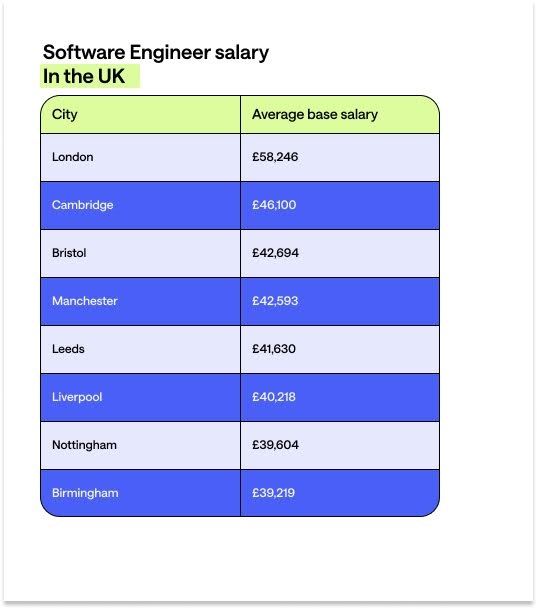
Software Engineer Salary by Job Title
Software engineering is a broad industry with many well-paying roles to choose from. Here are some common software engineering job titles and what you can earn in each. (Unless otherwise noted, all salary data is from Talent.)
Front-End Developer
Front-End Developers focus on building the front-end elements of websites or applications that people interact with and see. They learn programming languages like HTML, CSS and JavaScript.
Front End Developers also fix code errors and debug applications. As a Front-End Developer, you must understand user design and experience principles.
Front End Developer salaries in the UK, according to Glassdoor salary data:
1. Low-level salary: £32,000
2. Average base salary: £41,000
3. High-paying salary: £53,000+
Web Developer
Web Developers are similar to Front-End Developers, but they focus solely on websites. As a Web Developer, you’ll either build websites from scratch or manage existing websites. You may also be responsible for improving website loading speed, technical search engine optimisation (SEO), and other performance indicators.
Web Developer salaries in the UK:
1. Low-level salary: £26,000
2. Median salary: £33,000
3. Top-paying salary: £43,000+
Back-End Developer
Back-End Developers work on the back-end; i.e., all the elements that make an application run but users don’t see. As a Back-End Developer, you’ll likely use programming languages like Python, PHP and Ruby. Back-End Developers also work closely with Front-End and Web Developers to unite server-side (back-end) and front-end efforts.
Back-End Developer salaries in the UK:
1. Low-level salary: £53,000
2. Median base salary: £64,000
3. Top-paying salary: £78,000+
Full-Stack Developer
Full-Stack Developers work on front and back-end development. They tend to be generalists but have a few years of experience in both areas. Because their skills are so versatile, there’s a high demand for Full-Stack Developers.
Full-Stack Developer salaries in the UK:
1. Low-level salary: £41,000
2. Median base salary: £53,000
3. Top-paying salary: £70,000+
Cyber Security Engineer
Cyber Security Engineers focus on protecting a company’s networks, systems and data. They identify any potential security threats and create solutions to secure them. As a Cyber Security Engineer, you’ll be responsible for data security. Example tasks include installing firewalls, testing systems for vulnerabilities and analysing risk.
Cyber Security Engineer salaries in the UK:
1. Low-level salary: £34,000
2. Median base salary: £45,000
3. Top-paying salary: £61,000+
Data Engineer
Data Engineers combine data analytics with software engineering. As a Data Engineer, you’re responsible for designing and creating data systems. More specifically, your work will help companies collect, store and understand large amounts of raw data. You’ll also work to make data more accessible to other team members like Data Scientists and Business Analysts who interpret the data you provide.
Data Engineer salaries in the UK:
1. Low-level salary: £38,000
2. Median base salary: £48,000
3. Top-paying salary: £61,000
What Does a Software Engineer Do?
As a Software Engineer, you can develop software, websites or other applications. Software engineering is a broad discipline and can lead to many different career paths. Here are some of the basic skills and responsibilities to help you understand what you’ll do as a Software Engineer.
Software Engineer responsibilities:
Analyse complex information
Software Engineers dissect intricate data and systems to understand their functionalities and limitations. This level of analysis is important for identifying potential issues, optimising performance, and developing new features.
Translate client and user needs into practical business solutions
Bridging the gap between user expectations and technological capabilities, Software Engineers convert client requirements and user feedback into actionable development plans.
Write, test and rewrite code to improve existing programmes
Continuous improvement is a cornerstone of software development. Engineers rigorously write and test code to enhance its functionality, efficiency, and security. This process can involve tasks like debugging, refactoring, and sometimes overhauling large sections of code.
Find and fix bugs
Identifying and resolving software bugs is another Software Engineer responsibility. Engineers use a variety of debugging tools and techniques to diagnose problems, ensuring applications run smoothly and efficiently.
Collaborate with other programmers, Technical Writers, clients and colleagues across departments
Engineers work alongside programmers, Technical Writers, and other stakeholders, sharing knowledge and insights to guide the software’s development, documentation, and deployment.
Source new technologies that solve business problems
Software Engineers research and integrate emerging technologies that can offer competitive advantages. This can involve evaluating new tools, languages, and frameworks, that can improve product offerings and drive innovation.
Keep up with training needs and best practices
The tech landscape is ever-evolving. So continuous learning is essential for Software Engineers. They must stay informed of the latest industry trends, best practices, and technological advancements.
To become a Software Engineer, you should be interested in developing these skills in your career:
1. Technical skills: You’ve built a software application in JavaScript, for example.
2. Coding skills: You know different programming languages like JavaScript, SQL and CSS.
3. Commercial mindset: You understand the Software Development Life Cycle and how to meet business needs.
4. Communication: You communicate technical concepts to non-technical people.
5. Problem-solving: You ‘troubleshoot’ tech problems and fix bugs.
6. Analysis: You analyse technical information while understanding user and client requirements.
7. Commitment to training: You want to become a master in your field by continuously learning and improving.
Aside from demonstrating relevant skills (or a commitment to learning them), employers may require specific qualifications:
- At least a grade of 4/C GCSE (or equivalent) in Maths and English
- A Levels in relevant subjects like Computing
- A Software Engineering Level 4 apprenticeship standard or the willingness to work towards one
Are Software Engineers in Demand?
It’s unknown exactly how many Software Engineers currently work in the UK, but the total is likely comparable to other leaders in Europe, such as Germany. The problem for employers? The demand for Software Engineers doesn’t equal the supply. Add to that the fact that nearly 20% of engineers in the UK are likely to retire by 2026, and it’s clear that the role is in demand.
A quick search for “Software Engineer” jobs on LinkedIn also highlights the demand, with more 18,000 UK job openings on the platform as of February 2025.
Typical Software Engineer career progression
Freshly minted programming professionals often start their careers as Junior Software Developers. As they gain experience and specialisations, many progress into Data Engineering or other domains or become mid and senior-level SWEs.
To make the leap to mid-senior level, Software Engineers often require training and skill development in areas ranging from cyber security to AI. They also need to understand how to innovate, increase productivity, and connect the impact of specific projects to larger organizational goals.
If you’re looking to take the next step in your career as a Software Engineer, Multiverse’s Advanced Software Engineering programme could be right for you. Our programme focuses on applied impact and measured learnings, helping teams unlock enhanced productivity. The best part? You upskill on the job, meaning you don’t have to pause your career while learning — and employers cover the costs of the programme once they partner with Multiverse.
If you want to take the next step in your engineering career, create a profile with us today in just minutes. Our team can then double-check your eligibility and discuss apprenticeship options.
Sorry, no results found.